On this page
- Check the current official requirements first
- The workflow to map before choosing an integration
- 1. What creates the transaction?
- 2. Where does the required data come from?
- 3. What must be approved before submission?
- 4. Which route sends the document to MyInvois?
- 5. How will submission and validation states be tracked?
- 6. What happens when something fails?
- 7. How are corrections, rejections, and cancellations handled?
- 8. How does a valid result reach the next system or person?
- 9. How will the records be reconciled?
- A practical reference workflow
- Connection-readiness checklist
- Scope and governance
- Data and systems
- Workflow and controls
- Technical operations
- Acceptance and handover
- When integration is premature
- Keep people in the right parts of the loop
- Questions to ask a vendor or internal team
- Frequently asked questions
- Does every Malaysian SME need a direct MyInvois API integration?
- Is a successful API response the end of the workflow?
- Should the integration automatically retry every failed document?
- What should an SME automate first?
- Plan the connection as an operational system
- Sources checked
E-Invoice automation is not just a connection from accounting software to MyInvois. A reliable workflow starts earlier—with complete transaction data and an approved document—and continues after submission through validation, exceptions, corrections, delivery, and reconciliation.
If an SME automates only the API call, staff may still copy missing buyer details, chase approvals, resubmit duplicates, check statuses manually, and repair differences between MyInvois and the accounting system. The integration may be technically live while the operational work remains fragmented.
Quick answer: map the full path from transaction to reconciled record before building. Name the system of record, required data, approval gate, MyInvois connection method, validation states, retry rules, exception owner, customer-delivery step, and reconciliation evidence. Automate the stable path first; keep uncertain or high-risk cases visible to a person.
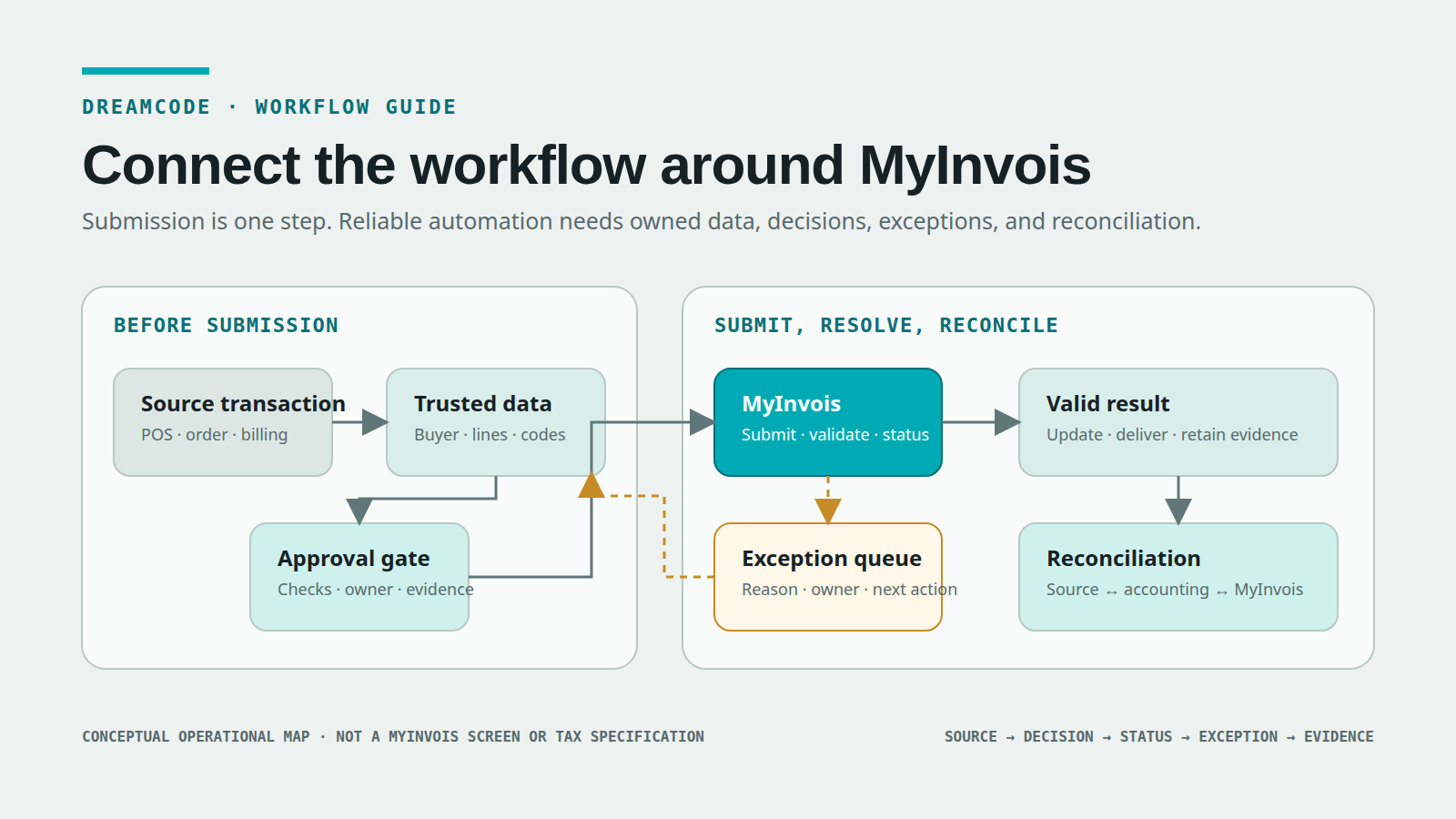
Conceptual Dreamcode workflow diagram. It shows operational connection points around MyInvois; it is not a MyInvois interface, tax form, or implementation specification.
Important: this is a workflow and system-readiness guide, not tax advice. Confirm your implementation date, exemption position, document treatment, required fields, and current rules with the latest official HASiL guidance and qualified advisers where appropriate.
Check the current official requirements first
Malaysia’s e-Invoice rollout has changed over time, so do not build from an old presentation or copied timeline. The official HASiL implementation timeline page, marked as updated on 30 August 2026 when this article was checked, lists:
- 1 August 2024 for taxpayers with annual revenue or sales above RM100 million
- 1 January 2025 for those above RM25 million and up to RM100 million
- 1 July 2025 for those above RM5 million and up to RM25 million
- 1 January 2026 for those up to RM5 million
- an exemption for taxpayers below RM3 million in annual revenue or sales
Those dates and thresholds are a checkpoint, not a substitute for reading the rules. Use the official e-Invoice guideline index to retrieve the current general and specific guidelines. At the time of checking, the page listed General Guideline version 4.8, published 30 August 2026, and Specific Guideline version 4.9, published 7 September 2026.
Before scoping any system work, have the business confirm which entities and transaction types are in scope. Record who made that determination, the official guidance version used, and when it must be reviewed again.
The workflow to map before choosing an integration
A useful e-Invoice process map follows one transaction from its source to a reconciled outcome. It should answer nine questions.
1. What creates the transaction?
Start with the event that may require an e-Invoice. Depending on the business, the source might be:
- a point-of-sale transaction
- a sales order or delivery confirmation
- an approved milestone or timesheet
- an e-commerce order
- a recurring billing run
- a supplier document
- an adjustment, credit, debit, or refund process
Do not start the map at “send to MyInvois.” By then, the data may already be wrong or incomplete.
For each source, name the system that owns the transaction and the identifier that follows it through the workflow. If sales, finance, and MyInvois all use different references, define how they are linked.
2. Where does the required data come from?
List every required field, its authoritative source, and the person or process responsible for keeping it current. Common groups include:
- supplier and buyer identity details
- Tax Identification Number and supporting identifier
- registration, contact, and address information
- document type and number
- issue date and time
- line descriptions, quantities, prices, discounts, and totals
- tax, currency, and classification codes
- references to an earlier document where relevant
The MyInvois SDK provides a Validate Taxpayer’s TIN API and a Search Taxpayer’s TIN API. That does not remove the need for customer-master ownership. Decide when validation occurs, what evidence is stored, and who resolves a mismatch.
A useful field map looks like this:
| Data group | Authoritative source | Check before submission | Exception owner |
|---|---|---|---|
| Buyer identity | Customer master | Required identifiers present and consistent | Finance or customer-data owner |
| Transaction lines | POS, order, or billing system | Quantity, price, description, and totals agree | Sales operations or billing |
| Tax and classification | Approved finance rules | Current permitted code and treatment selected | Finance or tax adviser |
| Document reference | Accounting or billing system | Unique internal reference; related document linked where required | Finance systems owner |
The table should be adapted to your actual obligations. It is a system-design aid, not a list of universal tax fields.
3. What must be approved before submission?
Automation needs a clear gate between “data assembled” and “ready to issue.” That gate may check:
- commercial approval already recorded
- delivery or service evidence complete
- customer data validated
- totals and currency reconciled
- required supporting reference present
- unusual value or treatment reviewed
- duplicate risk checked
Make the gate observable. “Finance checks it” is not enough. Define the evidence, decision owner, permitted outcomes, and what returns the document for correction.
If approval still happens in chat or email, decide how the system receives the decision. A notification is not an approval record unless the outcome and evidence return to the transaction.
4. Which route sends the document to MyInvois?
The right connection depends on transaction volume, source-system capability, exception complexity, and how much operational control the team needs.
Manual portal entry may be adequate for a smaller, low-frequency process that can be handled consistently by trained staff.
An accounting or ERP connector may fit when the current vendor supports the required document flows, statuses, and corrections. Check exactly what the connector covers rather than treating “MyInvois ready” as a complete specification.
Direct API integration or an intermediary may be justified when documents originate across several systems, volume is material, or the business needs controlled routing, monitoring, and reconciliation. The MyInvois SDK documents separate production and sandbox environments, taxpayer and intermediary authentication patterns, and the APIs exposed to ERP systems.
Do not choose custom integration merely because an API exists. First compare the cost and control of portal work, existing connectors, integration platforms, intermediaries, and a tailored service. Dreamcode’s ready-made tool, custom software, or AI agent comparison provides a broader way to make that choice.
5. How will submission and validation states be tracked?
The MyInvois e-Invoice API index separates document submission from later retrieval and status checks. The SDK FAQ describes workflow statuses including Submitted, Valid, Invalid, and Cancelled.
That means “HTTP request accepted” is not the same as “business process complete.” Your system should retain enough information to answer:
- Which internal transaction produced this document?
- Was the request sent once, retried, or blocked before sending?
- Which submission and document identifiers came back?
- Is validation still pending, valid, invalid, or cancelled?
- What validation details were returned?
- When and by which process was the status last checked?
The SDK also documents Get Submission, Get Document, Get Document Details, and Search Documents operations. Decide which operation supports each monitoring or reconciliation need.
6. What happens when something fails?
Design the exception path before the happy path goes live.
The SDK’s document validation rules cover structure, core fields, signatures, taxpayers, referenced documents, codes, duplicates, and currency. An exception queue should translate technical responses into work a named person can complete.
For each exception, capture:
- original transaction and document reference
- current state and failure category
- returned code and human-readable detail
- whether automatic retry is safe
- next action and owner
- due time or escalation rule
- correction history
- final resolution
Never retry every failure in the same way. A timeout may justify a controlled retry. Invalid buyer data needs correction. An authentication failure needs operational attention. A duplicate warning should stop another automatic submission until the team confirms what happened.
The SDK FAQ says callers should respect rate-limit headers and retry accordingly. It also notes that access tokens are valid for 60 minutes and should be reused for API operations rather than generated for every request. These are examples of integration rules that belong in the implementation, monitoring, and runbook—not in a developer’s memory.
7. How are corrections, rejections, and cancellations handled?
The original document is not the end of the workflow. The MyInvois API includes separate Cancel Document and Reject Document operations, with timing and document-type rules described in the SDK.
Map who can initiate each action, which approvals are required, what time limits apply, how the accounting record changes, and how the customer or supplier is informed. Do not overwrite the original status. Preserve the sequence of events and link replacement or referenced documents where required.
8. How does a valid result reach the next system or person?
After validation, the workflow may need to:
- update the accounting or ERP record
- store MyInvois identifiers and validation evidence
- generate or attach a validation link or QR code where appropriate
- deliver the document through the agreed customer channel
- update a sales, fulfilment, or collections process
- mark the item ready for reconciliation
Name the completion signal for every downstream handoff. Dreamcode’s guide to a good workflow handoff uses a practical contract: trigger, sender, receiver, payload, action, deadline, completion signal, and exception route.
9. How will the records be reconciled?
A production workflow needs a periodic check that the source system, accounting record, and MyInvois state still agree.
Reconciliation questions include:
- Does every in-scope source transaction have the expected document outcome?
- Are any submissions still pending beyond the normal interval?
- Did a valid MyInvois result fail to update the accounting system?
- Are there duplicate internal or external records?
- Were cancelled or corrected documents reflected everywhere they should be?
- Can finance trace each document from source to final status?
Reconciliation is not only a month-end report. It is the safety net for missed events, partial failures, delayed callbacks or polling, and manual corrections.
A practical reference workflow
Use this as a starting sequence, then replace every generic label with your actual system and role.
- Capture: a source system records an in-scope transaction with a stable internal identifier.
- Enrich: customer-master, product, tax, classification, and related-document data are added from named sources.
- Validate locally: required formats, totals, references, duplicates, and business rules are checked before transmission.
- Approve: the authorised role releases the document or routes it back for correction.
- Submit: the chosen connector sends the document and stores the request correlation, submission result, and identifiers.
- Track: the workflow checks the document until it reaches an actionable MyInvois state.
- Resolve: invalid, uncertain, rejected, cancelled, or failed items enter an owned exception path.
- Deliver and update: valid results return to the accounting record and the agreed recipient channel.
- Reconcile: scheduled controls identify missing, inconsistent, duplicated, or stalled records.
- Audit: authorised users can trace data, approvals, submissions, responses, corrections, and final disposition.
Connection-readiness checklist
Do not begin implementation until the team can answer most of these questions with evidence.
Scope and governance
- We checked the current official timeline, guidelines, and entity scope.
- A qualified owner has confirmed document and tax treatment where needed.
- One business sponsor can decide workflow and exception rules.
- We have selected one transaction flow for the first release.
- Success measures and the no-worse boundaries are recorded.
Data and systems
- The source system and authoritative field sources are named.
- Each transaction has a stable identifier across systems.
- Required buyer, supplier, line, code, currency, and reference data can be produced reliably.
- Data gaps have an owner and correction path.
- The accounting or ERP integration method is documented and testable.
Workflow and controls
- The pre-submission approval gate is explicit.
- Local validation and duplicate-prevention rules are defined.
- Submission, validation, delivery, correction, and reconciliation states are separate.
- Every exception category has a safe next action and owner.
- Automatic retries are limited to failures where repetition is safe.
Technical operations
- Sandbox credentials and representative, non-sensitive test data are available.
- Production and sandbox credentials are stored separately and securely.
- Token reuse, expiry, rate-limit, batching, timeout, and retry behaviour are designed from current SDK guidance.
- Logs avoid exposing secrets or unnecessary personal data.
- Monitoring detects stalled submissions, repeated failures, and reconciliation differences.
- A manual fallback and recovery runbook exist for outages.
Acceptance and handover
- Test cases include the normal path, missing data, invalid data, duplicate risk, timeout, authentication failure, rejection, cancellation, and correction.
- Finance can trace a test document from source to final state.
- Users know which system to update and which view is read-only.
- Access roles, support ownership, escalation, and change control are agreed.
- The team knows how official rule and SDK changes will be reviewed after launch.
When integration is premature
Delay custom automation when the process is still unclear or the upstream data cannot support it.
Warning signs include:
- different branches create the same transaction in incompatible ways
- customer identifiers are routinely missing or stored in free text
- finance cannot state when a document is ready to issue
- approvals happen inconsistently and leave no reliable record
- correction ownership is disputed
- the accounting system cannot expose or import the needed information
- transaction volume is low enough that a controlled portal process is safer for now
In those cases, first standardise the workflow, clean the master data, define ownership, or test a smaller connection. Dreamcode’s guide to what to automate first recommends work that is frequent, rule-based, measurable, and connected to a real operational outcome.
Keep people in the right parts of the loop
Human review is not a failure of automation. It is the correct design when a decision depends on uncertain data, unusual commercial terms, a high-value correction, or tax interpretation.
The goal is to automate repeatable movement and checking while making judgement work easier to see and complete. A useful exception view shows the document, source transaction, reason, evidence, permitted actions, owner, and deadline. It does not ask staff to reconstruct the whole history across several systems.
For a broader method, see Dreamcode’s guide to human review in AI workflows. The risk-based principle applies here even when no AI is involved: automate when the rules and evidence are clear; route uncertainty to an accountable person.
Questions to ask a vendor or internal team
Ask for specific answers to these before accepting an implementation plan:
- Which system is authoritative for each field and status?
- Which document flows, corrections, and edge cases are included in the first release?
- Does the solution use the portal, an accounting connector, an intermediary, or direct APIs—and why?
- How are credentials, tokens, permissions, and environment separation handled?
- How are requests correlated with internal transactions and made safe against duplicates?
- How does the system distinguish accepted submission from final validation?
- Which failures retry automatically, and which require a person?
- Where can finance see invalid, stalled, rejected, or cancelled documents?
- How do final statuses and references return to the accounting or ERP system?
- What reconciliation proves that no transaction or response was missed?
- What happens during a MyInvois, network, or source-system outage?
- Who monitors official guideline and SDK changes after handover?
Frequently asked questions
Does every Malaysian SME need a direct MyInvois API integration?
No. The connection method should follow the business’s current obligations, volume, source systems, exception profile, and control needs. A portal process or supported accounting connector may be appropriate. Direct integration or an intermediary becomes more relevant when several systems, larger volume, or stronger monitoring and reconciliation requirements make manual work difficult to control.
Is a successful API response the end of the workflow?
No. Submission and validation are distinct. The MyInvois SDK documents later status and document-retrieval operations, and the FAQ distinguishes Submitted, Valid, Invalid, and Cancelled states. Your workflow needs to track an actionable final state and route exceptions.
Should the integration automatically retry every failed document?
No. Retry temporary conditions only when repetition is safe and the current SDK guidance supports it. Invalid fields, duplicate risk, expired credentials, and business-rule failures require different handling. Keep the original attempt, returned detail, and resolution history.
What should an SME automate first?
Choose one high-volume or operationally painful document path with stable source data, a clear approval owner, defined exception rules, and a measurable reconciliation check. Prove that path before expanding to more entities, channels, or document scenarios.
Plan the connection as an operational system
The strongest e-Invoice automation plan does not begin with a connector demo. It begins with one real transaction and asks how trustworthy data, an authorised decision, a MyInvois result, an exception owner, and a reconciled accounting record fit together.
If your SME needs help mapping that path and comparing portal, connector, intermediary, and tailored integration options, Dreamcode’s enterprise automation service can turn the workflow into a scoped implementation plan. Where the process needs a tailored operational product, see custom software development.
The first recommendation may still be to clean data, simplify approvals, or use an existing connector before building custom software.
Sources checked
Evidence refreshed 26 September 2026. Official requirements and SDK behaviour can change; recheck them during design, testing, and before production release.
- HASiL: e-Invoice Implementation Timeline — current phased dates, thresholds, exemption statement, and page update date.
- HASiL: e-Invoice Guidelines — current general and specific guideline versions and downloads.
- MyInvois SDK — purpose of the system and ERP integration documentation.
- MyInvois SDK: e-Invoice APIs — TIN validation and search, document submission, cancellation, rejection, retrieval, submission lookup, and document search.
- MyInvois SDK: Document Validation Rules — structure, core field, signature, taxpayer, referenced-document, code, duplicate, and currency validation categories.
- MyInvois SDK: Frequently Asked Questions — environments, document statuses, authentication, rate limits, batching, retry signals, credentials, identifiers, and common technical issues.
- Dreamcode: What Does a Good Workflow Handoff Look Like? — supports explicit trigger, payload, receiver, action, completion, and exception design.
- Dreamcode: What Should You Automate First? — supports selecting a stable, measurable first workflow.
- Dreamcode: Ready-Made Tool, Custom Software, or AI Agent? — supports comparing existing tools, integrations, and tailored builds before choosing an approach.