On this page
- Start with the path, not the tool
- The four signs of a good first automation
- 1. It happens often enough to matter
- 2. The normal path follows recognisable rules
- 3. Inputs and outputs can be checked
- 4. A specific person owns the exceptions
- The expensive handoff is usually the real opportunity
- Good first automation examples
- Lead capture and routing
- Invoice intake and validation
- Booking or appointment intake
- Internal FAQ or SOP lookup
- What not to automate first
- A simple decision test
- Automate now if:
- Fix first if:
- Leave it manual for now if:
- How to scope the first release
- Why this matters for AI projects too
- If you are unsure, start here
- FAQ
- What is the best thing to automate first?
- Should I automate before fixing the process?
- Is AI better than automation?
- What if the workflow has too many exceptions?
- How do I know if a project is worth it?
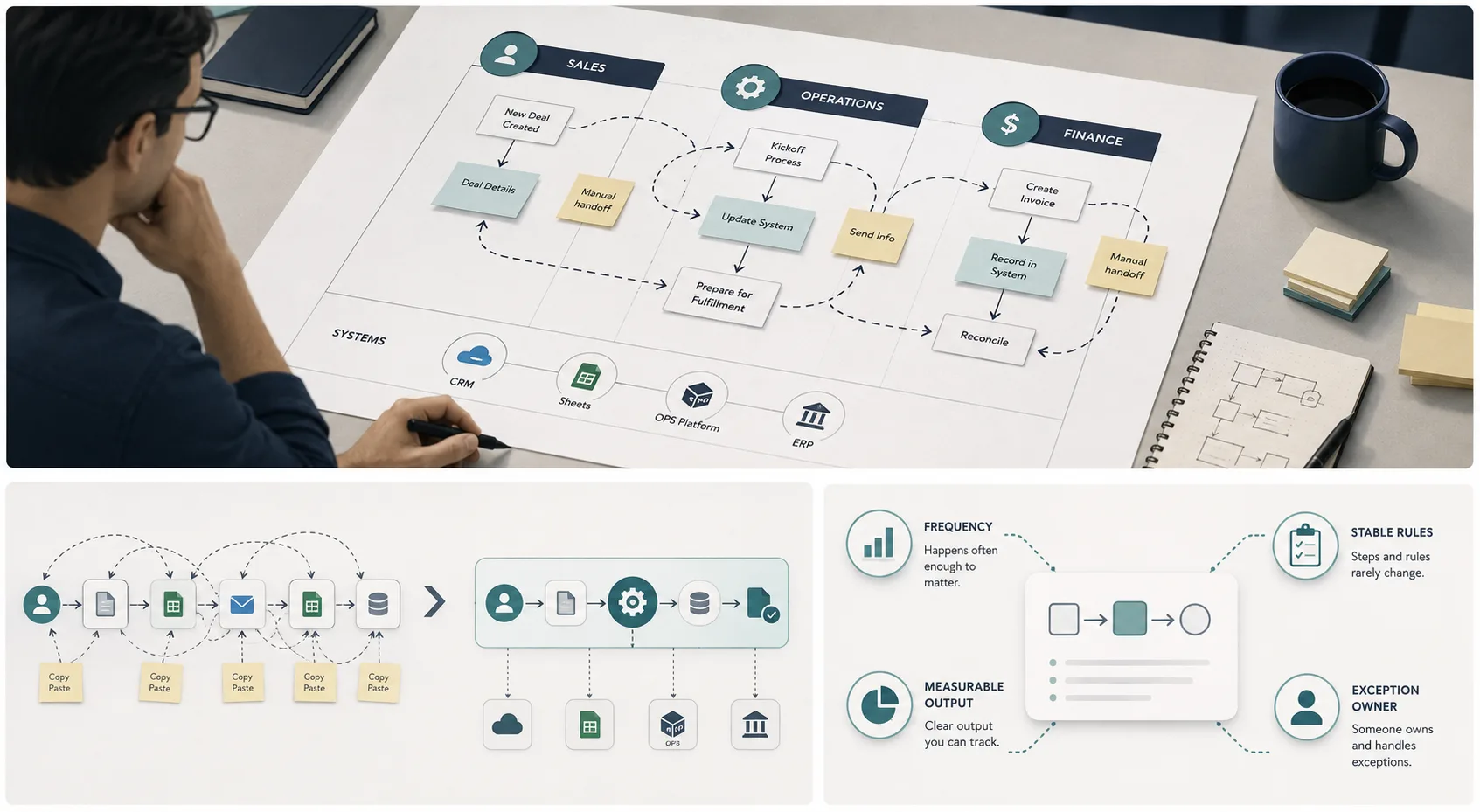
The best first automation is usually not the flashiest one. It is the recurring handoff where information gets copied, context gets lost, and someone has to clean up the result.
If you want a useful first automation project, look for work that happens often, follows recognisable rules, and has a clear owner for exceptions. That is where automation reduces friction without creating a mess somewhere else.
Quick answer: automate the workflow that is repetitive, easy to check, and annoying enough that people keep doing it manually. If the process is full of exceptions, unstable rules, or unclear ownership, fix the process first.
Start with the path, not the tool
Most teams start with a tool request:
- “Can we get an AI agent for this?”
- “Can we automate the whole department?”
- “Can we just connect this to that?”
That is the wrong first question.
Start by mapping one real piece of work from trigger to completion:
- What starts the work?
- Who touches it?
- What systems hold the information?
- Where does the decision happen?
- What causes the work to stop?
- What happens when the normal path breaks?
Once you can see the path, the right automation candidate usually becomes obvious.
The four signs of a good first automation
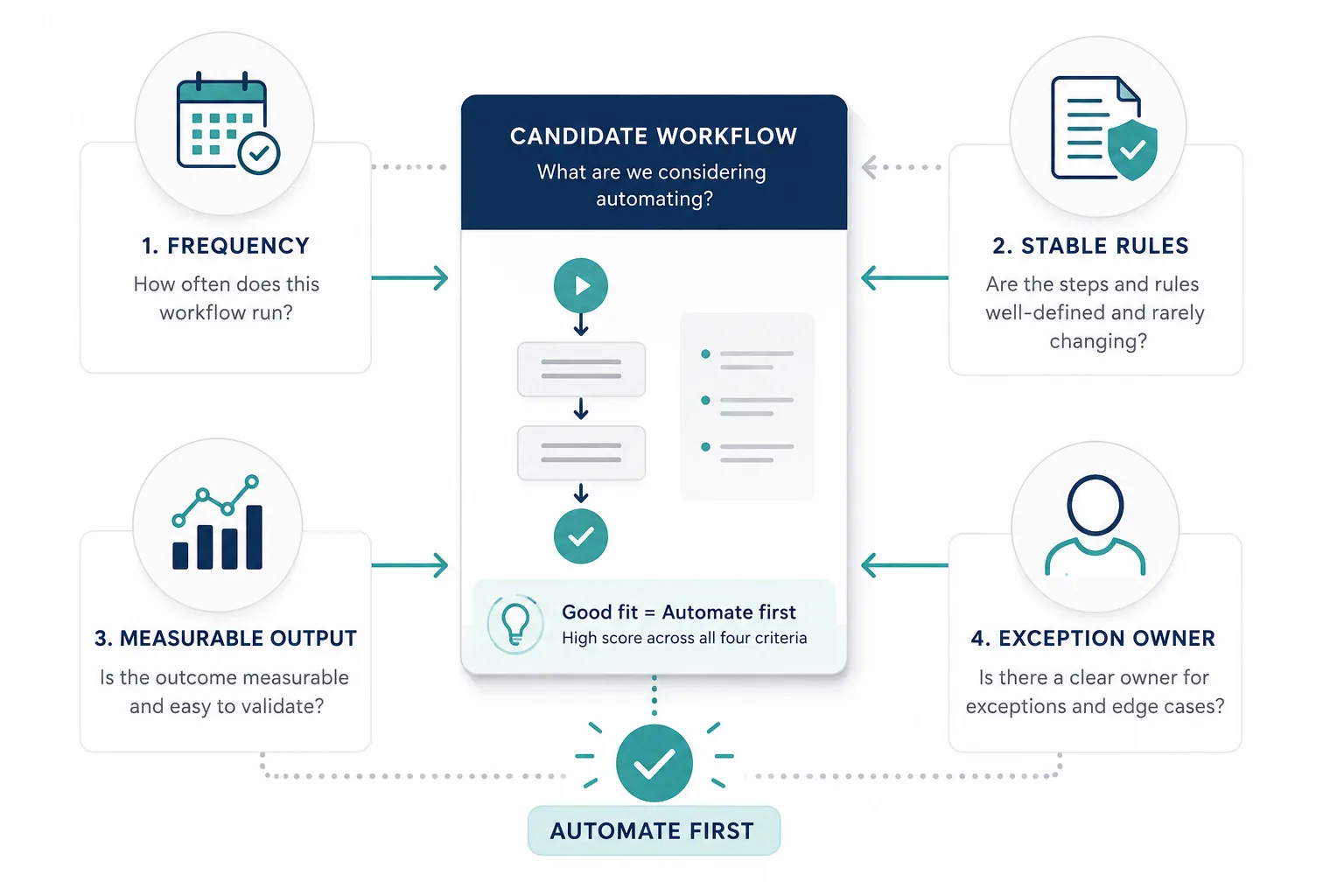
A good first automation usually has four traits.
1. It happens often enough to matter
If a workflow only happens once a month, automation may be useful, but it is rarely the best first project.
Look for work that appears every day, every week, or every time a customer or staff member takes a certain action. Repetition is what makes the return visible.
2. The normal path follows recognisable rules
The happy path should be predictable.
Examples:
- New enquiry arrives
- Customer submits a form
- Invoice is received
- Booking request is made
- Team member asks for a policy or SOP
If the main path is clear, automation can handle it. If the process depends on constant judgment, the system will be fragile.
3. Inputs and outputs can be checked
The best automation candidates have a result you can verify.
You should be able to answer:
- Did the right information arrive?
- Was the action completed?
- Was the output correct?
- Did someone need to fix it?
If you cannot measure whether the workflow is better, the project will be hard to manage.
4. A specific person owns the exceptions
Automation should not swallow ambiguity.
There must be a named person or team responsible for the edge cases, unusual requests, policy conflicts, or missing information. If no one owns the exceptions, the automation will either break quietly or create a support pile-up.
The expensive handoff is usually the real opportunity
Look for moments where someone:
- Downloads a file to upload it elsewhere
- Copies data from one system into another
- Reconciles two lists manually
- Waits for information that already exists
- Re-enters the same details in multiple places
- Chases someone for the next step
These handoffs are where time disappears. They are also where mistakes hide, because the work looks small until you count how often it happens.
Good first automation examples
Lead capture and routing
An enquiry form or WhatsApp message can be collected, classified, and sent to the right owner with context attached.
Why it works:
- Repetitive
- Easy to verify
- Clear business value
- Exceptions are manageable
Invoice intake and validation
Invoices can be extracted, checked, and routed for review before they reach finance.
Why it works:
- Frequent
- Structured
- Easy to validate
- Human review can catch exceptions
Booking or appointment intake
A request can be captured, validated, and routed into a calendar or scheduling flow.
Why it works:
- Repeats often
- The normal path is predictable
- The handoff is usually visible
- Errors are obvious
Internal FAQ or SOP lookup
Staff questions can be answered from approved information before a human gets involved.
Why it works:
- Repeated questions
- Low-risk if grounded properly
- Saves time for operations teams
- Improves consistency
What not to automate first
Do not start with work that is:
- Full of exceptions
- Poorly documented
- Owned by nobody
- Sensitive or high-risk
- Dependent on a changing policy
- Too broad to measure
If the process is already messy, automation can make the mess faster. That is why “automate everything” is a bad strategy: it sounds ambitious and usually creates more cleanup than value.
A simple decision test
Use this before you pick the first project.
Automate now if:
- The task repeats regularly
- The rules are mostly stable
- The output can be checked
- A human can review exceptions
- The work wastes time or delays response
Fix first if:
- The process is unclear
- Nobody owns the outcome
- The rules change every week
- The exceptions are the main part of the workflow
- The problem is really a policy or process issue
Leave it manual for now if:
- The volume is low
- The risk is high
- The cost of a mistake is large
- The workflow is still changing
How to scope the first release
The first release should prove the handoff can become clearer without moving risk somewhere else.
Keep the first version small:
- Pick one workflow.
- Define the happy path.
- List the exceptions.
- Decide who reviews the edge cases.
- Measure the result before and after.
Useful metrics include cycle time, response time, rework rate, exception volume, and human review time. If the numbers improve, you have a good candidate for the next step.
Why this matters for AI projects too
The same rule applies when AI is involved. AI is not the starting point; the business problem is.
- Which handoff is slow?
- Which answer is repeated all day?
- Which step loses context?
- Which task is safe enough to assist, but not safe enough to fully trust?
When you answer those questions first, AI becomes a tool instead of a gamble. The useful system is usually the one that fits the way people actually operate.
If you are unsure, start here
Pick one recurring handoff and write it down in plain language. Then answer these questions:
- What triggers it?
- Who owns it?
- What information is needed?
- What counts as success?
- What counts as an exception?
If you can answer those five questions, you can usually identify the right first automation.
FAQ
What is the best thing to automate first?
Usually the most repetitive handoff with clear rules and visible exceptions. If you can measure the waste, it is probably worth looking at.
Should I automate before fixing the process?
Usually no. If the workflow is unclear, automate the wrong thing and you just get a faster mess.
Is AI better than automation?
Not always. AI helps with interpretation and language-heavy work. Simple repeatable handoffs often need basic automation first.
What if the workflow has too many exceptions?
Keep it manual or redesign it first. Exceptions should be visible, not hidden inside an overconfident system.
How do I know if a project is worth it?
Look for repetition, time saved, fewer handoffs, and a measurable reduction in rework or response time.