On this page
- “Human in the loop” should mean a real control
- The five strongest reasons to require review
- 1. The consequence is hard to reverse
- 2. The output is difficult to verify automatically
- 3. The case is unusual
- 4. The work involves sensitive people or information
- 5. Confidence is low or evidence is missing
- Three operating modes
- Mode 1: AI assists, human decides
- Mode 2: AI acts, human reviews exceptions
- Mode 3: AI acts, humans audit samples
- A practical review matrix
- How to design review without creating a bottleneck
- Route only meaningful exceptions
- Show the evidence beside the recommendation
- Give the reviewer explicit actions
- Record corrections
- Measure review burden
- Common mistakes
- Reviewing everything forever
- Using a confidence score as the only control
- Hiding context from the reviewer
- Giving responsibility without authority
- FAQ
- Does every AI workflow need a human in the loop?
- Can human review be temporary?
- How should low-confidence outputs be handled?
- Who should be the reviewer?
- What should be logged?
- Ready to design a useful review step?
Keep a human in the loop when an AI decision is hard to reverse, difficult to verify, sensitive, unusual, or expensive when wrong. Let the system act automatically only when the outcome is low-risk, measurable, and recoverable.
Human review is not a sign that automation failed. It is a design choice that places judgment where it creates the most value.
Quick answer: use human review for high-impact decisions, low-confidence outputs, sensitive data, novel cases, and policy exceptions. Automate routine, reversible actions with clear validation rules.

“Human in the loop” should mean a real control
The phrase is often added to proposals as reassurance. But a reviewer who receives hundreds of unclear alerts is not a control. That is a queue with a person attached.
A useful human-review step answers five questions:
- What triggers review?
- What evidence does the reviewer see?
- What decision can they make?
- What happens after approval or rejection?
- How is the outcome recorded?
If those questions are unanswered, “human oversight” is only a slogan.
The five strongest reasons to require review
1. The consequence is hard to reverse
Some actions are easy to undo. A draft summary can be edited. A suggested category can be changed.
Other actions create lasting consequences: rejecting an application, sending a sensitive message, changing an account, approving a payment, or publishing advice. These need a person with authority to check the result before it moves.
2. The output is difficult to verify automatically
Automation works best when correctness can be tested.
If the answer can be compared with a source, validated against rules, or reconciled with a system of record, more of the flow can run automatically. If quality depends on nuance, policy interpretation, or incomplete context, human judgment matters.
3. The case is unusual
AI systems are often useful on common patterns and less reliable on rare combinations. A novel request, missing field, conflicting instruction, or unusual customer circumstance should leave the normal path.
Exceptions should be visible and routed, not forced through a confident-looking answer.
4. The work involves sensitive people or information
Review becomes more important when a workflow touches employment, finance, health, legal obligations, personal data, safety, or vulnerable customers.
The right design depends on context, but the principle is simple: the more sensitive the consequence, the stronger the approval, evidence, and audit trail should be.
5. Confidence is low or evidence is missing
Confidence should not be treated as truth, but it can be one useful routing signal when combined with validation.
Send a case for review when:
- Required information is missing
- Sources disagree
- The output violates a business rule
- The model cannot cite supporting evidence
- The request falls outside the intended scope
Three operating modes
Mode 1: AI assists, human decides
The system prepares information, drafts an answer, highlights risk, or recommends an action. A person makes the final decision.
Use this when the consequence is significant or the work requires accountable judgment.
Examples:
- Drafting a response to a complaint
- Summarising a contract for legal review
- Recommending how to handle a policy exception
- Preparing a credit assessment for an authorised decision-maker
Mode 2: AI acts, human reviews exceptions
The system completes routine cases and routes uncertain or invalid cases to a person.
Use this when the normal path is predictable, checks are available, and mistakes are recoverable.
Examples:
- Classifying routine enquiries
- Extracting fields from standard documents
- Matching transactions with validation rules
- Routing tickets by topic and urgency
Mode 3: AI acts, humans audit samples
The system handles the workflow automatically while people inspect a sample of outcomes and monitor performance.
Use this only when individual actions are low-risk, validation is strong, and rollback is easy.
Examples:
- Tagging internal content
- Creating non-public metadata
- Deduplicating low-risk records
- Generating draft internal summaries
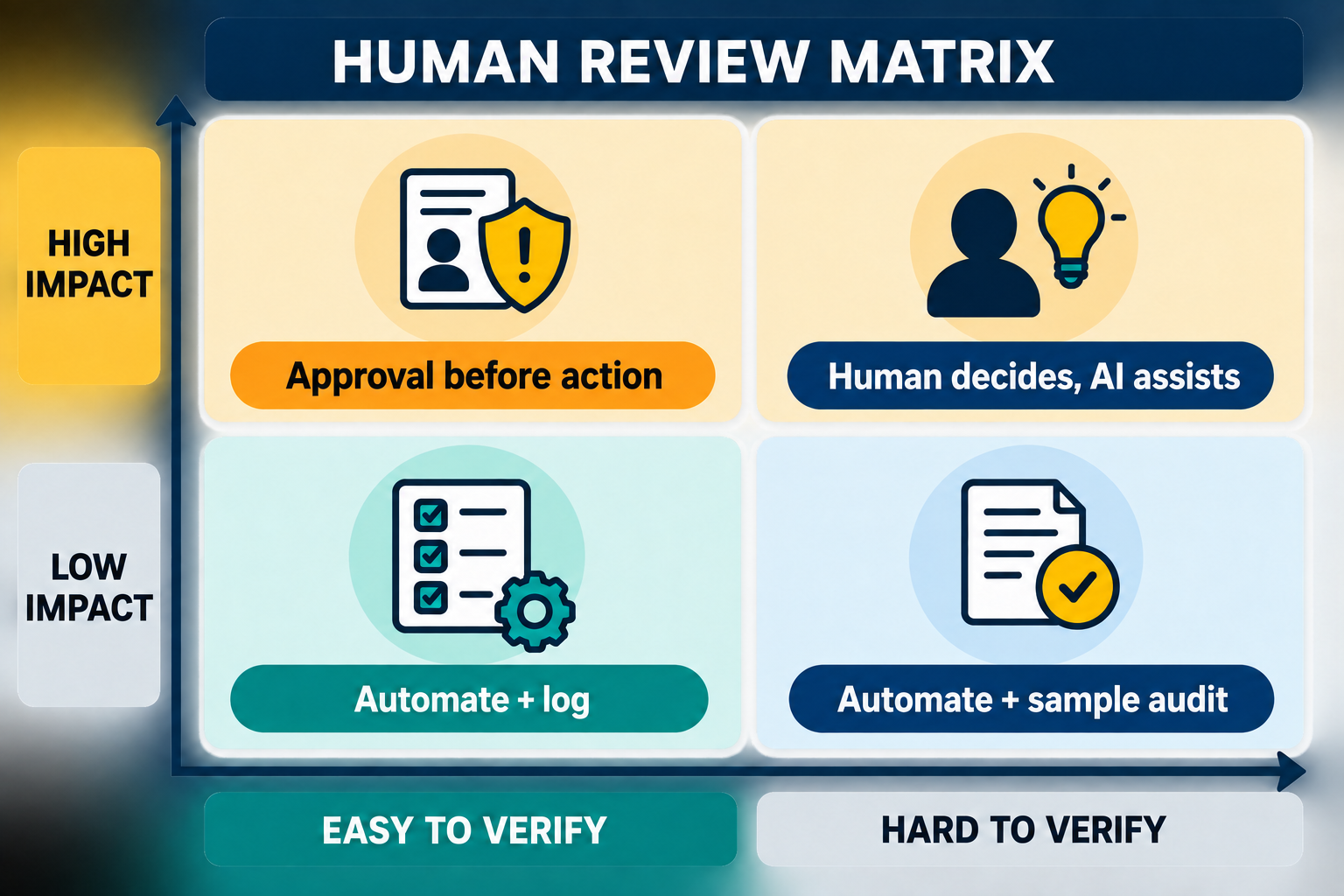
A practical review matrix
Score the workflow across four dimensions:
- Impact: what happens if the output is wrong?
- Reversibility: can the action be undone quickly?
- Verifiability: can rules or source evidence confirm the result?
- Novelty: how often does the case fall outside normal patterns?
Then choose a control:
- Low impact + easy verification: automate with logging
- Low impact + weak verification: automate drafts, sample-audit outcomes
- High impact + easy verification: automate checks, require approval for action
- High impact + weak verification: human decision with AI assistance only
This matrix is more useful than a blanket rule because it connects review effort to actual risk.
For a practical assessment of a workflow, start with AI consultation or enterprise automation. Related guidance: why AI projects can fail at adoption.
How to design review without creating a bottleneck
Route only meaningful exceptions
Do not ask a person to confirm every routine result. Create clear triggers based on missing data, failed validation, policy rules, or unusual patterns.
Show the evidence beside the recommendation
Reviewers should see the original input, relevant source, model output, validation result, and reason for escalation in one place.
Give the reviewer explicit actions
Use clear decisions such as approve, correct, reject, request information, or escalate. Avoid an open text box as the only control.
Record corrections
Capture why the reviewer changed the output. Corrections can reveal bad rules, missing data, confusing instructions, and new exception categories.
Measure review burden
Track:
- Percentage of cases reviewed
- Time per review
- Override rate
- Recurring exception types
- Errors found after approval
If the review queue grows without improving outcomes, redesign the workflow.
Common mistakes
Reviewing everything forever
Full review can be appropriate during a pilot. It should not become the permanent design unless the risk requires it.
Using a confidence score as the only control
Confidence can be misleading. Combine it with business rules, source checks, scope limits, and outcome monitoring.
Hiding context from the reviewer
A reviewer cannot make a good decision from an isolated AI answer. Put the evidence and reason for escalation in front of them.
Giving responsibility without authority
The reviewer must know what they are allowed to approve, change, or escalate. Otherwise the loop adds delay without adding control.
FAQ
Does every AI workflow need a human in the loop?
Not every individual action needs pre-approval. Every production workflow does need accountable ownership, monitoring, and a way to handle exceptions.
Can human review be temporary?
Yes. During a pilot, full review can establish a baseline. As evidence improves, routine cases may move to exception review or sample auditing.
How should low-confidence outputs be handled?
Route them with the source material, validation result, and a clear reason for review. Do not simply show a vague “low confidence” warning.
Who should be the reviewer?
The person or team with the relevant business authority and context—not automatically the technical team that built the system.
What should be logged?
Record the input, output, model or workflow version, validation results, reviewer decision, correction, timestamp, and downstream action where appropriate.
Ready to design a useful review step?
If your AI workflow needs human judgment without creating a permanent approval queue, Dreamcode can help map the risk, exception rules, and review experience before implementation.