On this page
- Why handoffs create more friction than tasks
- The anatomy of a good handoff
- 1. A clear trigger
- 2. Complete context
- 3. One current owner
- 4. A defined next action
- 5. A timing expectation
- 6. A completion signal
- 7. An exception path
- A simple handoff contract
- Example: lead qualification to sales
- Example: invoice intake to finance review
- How to improve a handoff
- Step 1: Observe the real workflow
- Step 2: Find the moment ownership changes
- Step 3: Define the minimum payload
- Step 4: Make state visible
- Step 5: Design exceptions
- Step 6: Measure the wait
- Metrics that reveal handoff quality
- Where automation helps
- Common handoff mistakes
- Sending a notification without transferring ownership
- Copying every field
- Using chat as the system of record
- Designing only the happy path
- FAQ
- What is a workflow handoff?
- What information should a handoff include?
- Should every handoff be automated?
- What is the difference between a handoff and a notification?
- How do you find a bad handoff?
- Ready to make handoffs clearer?
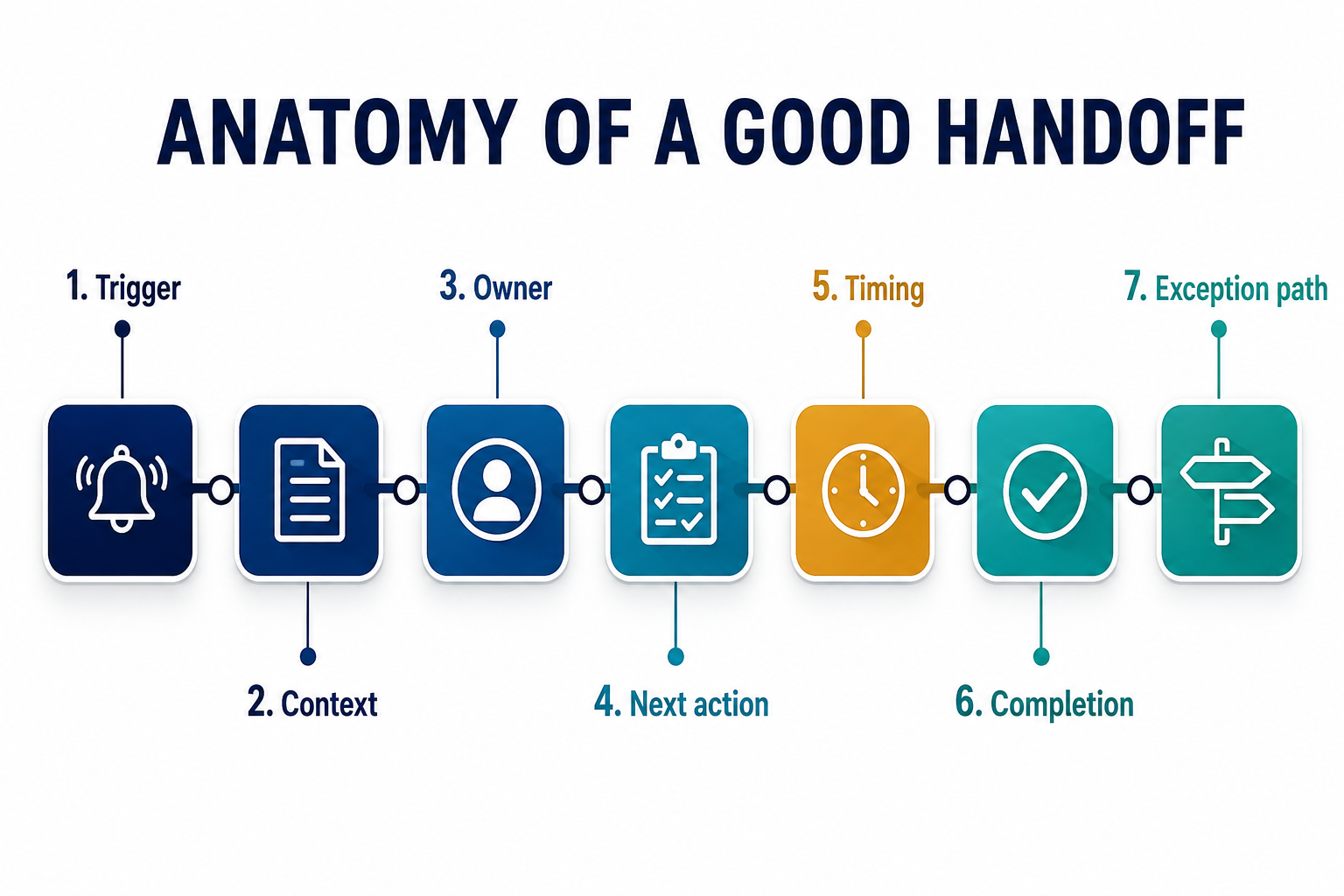
A good workflow handoff gives the next person or system the right context, a clear owner, a due time, a defined next action, and a visible exception path. It transfers responsibility, not merely information.
Weak handoffs create chasing, duplicate work, and silent delays. Strong handoffs make the state of work obvious without a meeting or follow-up message.
Quick answer: every handoff should answer: what happened, what happens next, who owns it, when it is due, what evidence is attached, and what to do if the normal path cannot continue.

Why handoffs create more friction than tasks
The task itself may take five minutes. The delay happens around it:
- Someone waits for missing information
- The new owner does not know the request is ready
- Two systems show different statuses
- The request arrives without decision history
- Nobody knows whether the previous step is complete
- An unusual case sits outside the normal queue
Each gap looks small. Across hundreds of requests, handoff friction becomes a real operating cost.
The anatomy of a good handoff
1. A clear trigger
The handoff should occur because a defined event happened: a form was submitted, approval was granted, payment arrived, validation passed, or a deadline was reached.
“When someone thinks it is ready” is difficult to automate and difficult to manage.
2. Complete context
The receiver needs enough information to act without reconstructing the story.
Useful context may include:
- Request details
- Customer or account identifier
- Previous decisions
- Source documents
- Validation results
- Relevant policy or service level
- Reason for escalation
More data is not always better. Provide what the next decision requires.
3. One current owner
Shared visibility is useful. Shared accountability is often vague.
At each stage, one person, role, or queue should own the next action. The owner can collaborate, but the workflow should show who is responsible for movement.
4. A defined next action
“Please check” forces the receiver to interpret the request. A good handoff names the action: approve, correct, schedule, contact, reconcile, request information, or escalate.
5. A timing expectation
The handoff should carry a due time, priority, or service-level rule where timing matters. Otherwise urgent work and routine work compete in the same invisible queue.
6. A completion signal
The sender and the system need to know when the next action happened. Status should update in one dependable place rather than requiring a reply such as “done.”
7. An exception path
If information is missing, a system is unavailable, or the case falls outside policy, the workflow should route the problem to a named owner with a reason.
A simple handoff contract
Use this template when designing or reviewing a handoff:
- Trigger: what makes the handoff valid?
- Sender: which person or system creates it?
- Receiver: who owns the next action?
- Payload: what information and evidence travel with it?
- Action: what should the receiver do?
- Deadline: when should it happen?
- Completion: how is success recorded?
- Exception: where does the case go if it cannot continue?
This contract can describe a manual process before any automation is built.
Example: lead qualification to sales
A weak handoff sends a message: “New website lead—please follow up.”
A stronger handoff includes:
- The form submission as the trigger
- Contact and company details
- The problem described by the prospect
- Consent and preferred channel
- Qualification result and supporting reason
- Named sales owner
- Response-time target
- A status update after contact
- A route for incomplete or suspicious submissions
The second design reduces interpretation and makes performance measurable.
Example: invoice intake to finance review
A weak handoff drops a PDF into a shared folder.
A stronger handoff includes:
- Receipt timestamp and source
- Supplier identity
- Extracted invoice number, amount, and date
- Duplicate and purchase-order checks
- Original document
- Validation status
- Named approval queue
- Exception reason when fields conflict
- Recorded approval or rejection
Automation helps because the handoff is explicit—not because the PDF moved automatically.
How to improve a handoff
Step 1: Observe the real workflow
Follow one request from start to finish. Note every copy, message, wait, lookup, clarification, and status change.
Step 2: Find the moment ownership changes
Write down what the sender assumes and what the receiver actually needs.
Step 3: Define the minimum payload
Include the evidence required for the next action. Remove fields nobody uses.
Step 4: Make state visible
Use a system of record or shared status that answers: where is this, who owns it, and what happens next?
Step 5: Design exceptions
List the common reasons the handoff fails and route each one deliberately.
Step 6: Measure the wait
Track time between readiness and acceptance, not only time spent on the task itself.
Metrics that reveal handoff quality
- Time waiting between stages
- Requests returned for missing information
- Number of clarification messages
- Duplicate entries or records
- Unassigned or overdue cases
- Exception rate by category
- Rework after completion
- End-to-end cycle time
The goal is not a perfect dashboard. A few consistent measures can reveal where the workflow loses momentum.
Where automation helps
Automation is useful when it can:
- Detect the trigger
- Gather context from approved sources
- Validate required information
- Assign the correct owner
- Start a timer or service-level rule
- Notify the receiver in the right channel
- Update status after action
- Route exceptions with evidence
Do not automate ambiguity away. If the team disagrees on who owns a case or what “ready” means, settle that decision first.
For implementation support, see enterprise automation or custom solutions. Start with what to automate first or why automation projects fail.
Common handoff mistakes
Sending a notification without transferring ownership
A message tells someone something happened. It does not automatically make them accountable.
Copying every field
Large payloads can hide the information needed for the next decision. Design for relevance.
Using chat as the system of record
Chat is useful for attention. It is weak for durable state unless the decision is also recorded in the workflow.
Designing only the happy path
The handoff is most valuable when information is incomplete or the normal owner cannot proceed.
FAQ
What is a workflow handoff?
It is the point where responsibility for the next action moves from one person, team, or system to another.
What information should a handoff include?
The trigger, relevant context, current owner, required action, timing, completion signal, and exception route.
Should every handoff be automated?
No. First make the manual handoff clear. Automate when volume, delay, or repeated data movement justifies it.
What is the difference between a handoff and a notification?
A notification creates awareness. A handoff also transfers ownership and defines what happens next.
How do you find a bad handoff?
Look for waiting, chasing, repeated questions, duplicate entry, unclear status, and work that frequently returns to the previous person.
Ready to make handoffs clearer?
If work keeps bouncing between inboxes, spreadsheets, and systems, Dreamcode can map the handoffs and design a clearer path before automating it.