On this page
- Why WhatsApp enquiries become difficult to manage
- The minimum viable WhatsApp CRM workflow
- 1. Capture the enquiry
- 2. Acknowledge receipt
- 3. Assign one owner
- 4. Set the stage and next action
- 5. Follow up from a due list
- 6. Record an outcome
- What the CRM record should contain
- WhatsApp Business App or WhatsApp Business Platform?
- Design the human handoff before automation
- A practical implementation sequence
- Step 1: Review real enquiries
- Step 2: Draw the current path
- Step 3: Define the minimum record and stages
- Step 4: Set ownership and service expectations
- Step 5: Run the workflow manually
- Step 6: Automate the smallest reliable handoffs
- Step 7: Test normal and abnormal cases
- Step 8: Launch narrowly and measure
- Where AI helps—and where it should wait
- Data protection and messaging boundaries in Malaysia
- Common mistakes
- Treating the chat inbox as the pipeline
- Copying every message into the CRM
- Creating too many stages
- Automating follow-up without an owner
- Measuring only response speed
- Adding AI before the workflow works
- Frequently asked questions
- Can WhatsApp work as a CRM by itself?
- Do we need the WhatsApp Business Platform to connect a CRM?
- Should every WhatsApp message create a new lead?
- What should be automated first?
- How can we avoid missed follow-ups?
- How much does a WhatsApp CRM integration cost?
- Build the workflow before buying the stack
- Sources checked
A useful WhatsApp CRM workflow does one basic job: it turns a message into owned, visible work. Every genuine enquiry should create or update a customer record, show who owns the next action, carry a follow-up date, and end with a recorded outcome.
You do not need AI to start. You may not need an API either. First make the operating rules clear enough that a person can follow them consistently. Then choose the smallest technology that removes the expensive handoffs.
Quick answer: begin with six states: new enquiry → acknowledged → qualified → follow-up due → won or closed, with a separate route for duplicates, spam, complaints, and sensitive cases. Record the source, customer, owner, stage, next action, due time, and outcome in one system of record. Automate capture and reminders only after those fields and responsibilities work manually.
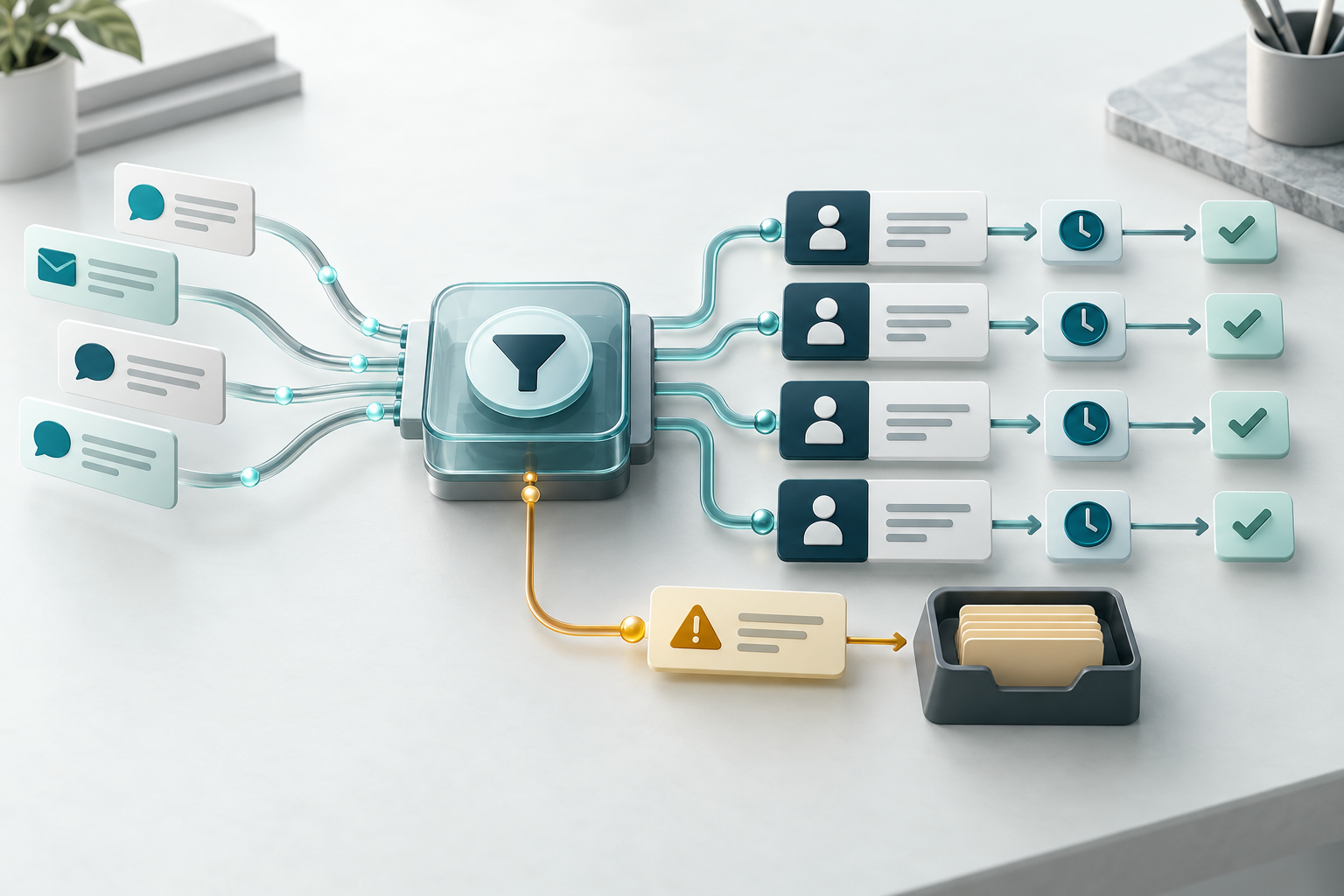
Conceptual Dreamcode editorial artwork. It illustrates enquiry routing and exception handling; it is not a WhatsApp or CRM product screen.
Why WhatsApp enquiries become difficult to manage
WhatsApp makes it easy for a customer to start a conversation. It does not automatically give a business a dependable sales process.
The problems usually appear around the conversation:
- a message reaches the business but no one is clearly responsible for it
- two staff members reply while another enquiry receives no response
- customer details are copied into a spreadsheet without the conversation context
- the team remembers to follow up only when someone scrolls through old chats
- a lead changes stage in the CRM but the conversation remains with another person
- management can count messages but cannot see qualified opportunities or outcomes
- unusual cases have no escalation path
Adding a CRM does not fix those gaps by itself. A CRM can hold the record, but the workflow still needs a trigger, owner, next action, completion signal, and exception route.
If those parts are unclear, an integration will move confusion faster.
The minimum viable WhatsApp CRM workflow
Start with one path that a new sales enquiry can follow from first contact to a recorded result.
1. Capture the enquiry
Create or update a CRM record when a genuine enquiry arrives. The record should preserve enough context for the next person to act without reconstructing the conversation.
At minimum, capture:
- contact name and WhatsApp number
- date and time received
- source or campaign, where known
- product, service, branch, or topic
- short enquiry summary
- consent or contact-preference evidence relevant to the intended follow-up
- link or reference to the original conversation
Avoid collecting details merely because the CRM has an empty field. Collect what the workflow needs for its stated purpose.
2. Acknowledge receipt
The customer should know that the message reached the business and what happens next. The acknowledgement can be manual or automated, but it should set a realistic expectation.
A useful acknowledgement might confirm:
- that the enquiry was received
- which team will handle it
- whether more information is required
- when the customer should expect the next response
- how to reach a person for an urgent or sensitive matter
Do not promise an immediate response if the team cannot deliver one consistently.
3. Assign one owner
Shared access is not the same as shared accountability. Give every active enquiry one current owner or one clearly named queue.
Assignment rules can use:
- product or service
- branch or territory
- language
- new customer versus existing account
- business hours
- salesperson capacity
- campaign or referral source
If no rule matches, send the enquiry to a visible triage queue. Never let an unmatched case disappear silently.
4. Set the stage and next action
A stage says where the enquiry is. A next action says what must happen.
For example:
| Stage | What it means | Required next action |
|---|---|---|
| New | Received but not reviewed | Check details and assign an owner |
| Acknowledged | Customer knows the enquiry is in progress | Qualify the request |
| Qualified | The need and fit are clear enough to proceed | Prepare the agreed follow-up |
| Follow-up due | Waiting for a named action or date | Contact the customer or complete the promised work |
| Won | The defined commercial outcome happened | Record value and hand off fulfilment |
| Closed | The enquiry will not proceed | Record a useful reason |
These labels are a starting point, not a universal CRM model. Use fewer stages if staff cannot apply them consistently. Add a stage only when it changes ownership, action, or reporting.
5. Follow up from a due list
The team should not depend on chat order or memory. Every active enquiry needs a next-action date, and each owner needs a view of what is due or overdue.
A follow-up record should answer:
- Who owns it?
- What was promised?
- When is it due?
- What information is needed first?
- What happens if the customer does not reply?
Keep the sequence proportionate. A high-intent quotation request and a broad price question may not need the same follow-up path.
6. Record an outcome
A workflow is incomplete if records stay open forever.
Use outcomes that help the team learn, such as:
- won
- no response
- not a fit
- timing changed
- duplicate
- spam
- referred elsewhere
- lost on price
- lost on capability
Do not turn the outcome list into a form-filling exercise. Choose reasons that lead to a decision, such as changing qualification questions, improving campaign targeting, or clarifying a service page.
What the CRM record should contain
The system of record can be a CRM, a suitable helpdesk, or a structured database. For a very small pilot, it may begin as a controlled table. What matters is that the team agrees which record is authoritative.
Use a compact field set:
| Field | Why it matters |
|---|---|
| Contact and organisation | Identifies who is asking |
| WhatsApp number | Matches the conversation to the record |
| Enquiry source | Shows how the contact reached the business |
| Product, service, or topic | Supports routing and reporting |
| Summary | Gives the owner usable context |
| Current owner | Makes responsibility visible |
| Stage | Shows the current position in the workflow |
| Next action | States what must happen |
| Next-action date | Creates a dependable due list |
| Last meaningful contact | Helps detect stalled enquiries |
| Consent or preference evidence | Supports appropriate contact decisions |
| Outcome and reason | Closes the loop and improves reporting |
Keep message content and CRM fields separate in your design. The conversation may contain detailed context, while the CRM should hold the operational facts needed to manage the relationship.
WhatsApp Business App or WhatsApp Business Platform?
The right choice depends on the workflow, not the size of the feature list.
Meta provides a WhatsApp Business App and a WhatsApp Business Platform. The Platform is the integration route for programmatic messaging and business systems; current setup, messaging, template, policy, and pricing requirements should be checked in Meta’s official documentation before implementation.
| Start with the Business App when… | Consider the Business Platform/API when… |
|---|---|
| enquiry volume is manageable manually | messages must create or update records automatically |
| one small team can maintain clear ownership | routing spans teams, branches, shifts, or systems |
| staff can update the CRM after each meaningful conversation | manual copying causes missed or inconsistent records |
| reminders and basic operating discipline solve the main problem | the workflow needs event-driven reminders, templates, or integrations |
| the business is still learning what fields and stages it needs | the manual workflow is stable enough to specify and test |
Do not choose the Platform only because it appears more advanced. It introduces implementation, account, message-policy, template, pricing, monitoring, and support considerations. Meta’s official pricing page should remain the source of truth because rates and charging rules can change.
Likewise, avoid unofficial connections that imitate WhatsApp Web or depend on a personal session staying logged in. A customer channel should have clear account ownership, access control, recovery, and support arrangements.
Design the human handoff before automation
Some enquiries should leave the normal sales path immediately.
Create explicit routes for:
- complaints or angry customers
- payment, refund, or contract disputes
- health, financial, identity, or other sensitive information
- threats, harassment, or safety concerns
- requests the team is not authorised to answer
- existing-customer service cases
- duplicates, spam, or suspected fraud
- integration failures and incomplete records
For each exception, name the destination, required context, response expectation, and completion signal. “Send to manager” is not enough if no one can see whether the manager accepted it.
Dreamcode’s guide to good workflow handoffs offers a reusable contract: trigger, sender, receiver, payload, action, deadline, completion, and exception.
A practical implementation sequence
Step 1: Review real enquiries
Take a representative sample of recent conversations. Remove or protect personal information during analysis as appropriate. Group the conversations by intent, route, outcome, missing information, and exception type.
Do not design from the team’s memory alone. Real conversations show where customers use different words, omit information, switch topics, or return after a delay.
Step 2: Draw the current path
Map one enquiry from arrival to outcome. Include every copy, spreadsheet update, notification, wait, approval, and follow-up.
Mark where:
- ownership changes
- information is re-entered
- a customer waits
- two systems disagree
- staff make a judgment
- an exception leaves the normal path
This map usually reveals whether the first improvement is a rule, a queue, a CRM change, or an integration.
Step 3: Define the minimum record and stages
Choose only the fields and stages needed to operate the first version. Write a one-sentence definition for each stage and a completion rule for each required field.
Test the definitions on real examples. If two staff members classify the same enquiry differently, clarify the rule before building automation.
Step 4: Set ownership and service expectations
Decide who owns:
- triage
- each sales route
- overdue follow-up
- data corrections
- exceptions
- workflow configuration
- reporting
Then set operating expectations the team can meet. Response and follow-up targets should be internal commitments based on staffing and customer needs, not unsupported universal benchmarks.
Step 5: Run the workflow manually
Use the selected fields, stages, due dates, and exception routes for a limited period. The objective is to find ambiguous rules before software makes them harder to see.
Watch for:
- records created without enough context
- owners who do not receive or accept assignments
- stages that mean different things to different people
- reminders that arrive too early or too late
- open enquiries with no next action
- exceptions that re-enter the normal queue incorrectly
Step 6: Automate the smallest reliable handoffs
Once the manual process is stable, automate the repetitive parts first:
- create or match the contact and enquiry record
- attach source and conversation reference
- apply a deterministic routing rule
- notify the owner
- create the next-action task
- flag missing data or failed updates
Keep irreversible, sensitive, or commercially consequential decisions with a person until the evidence supports a safer design.
Step 7: Test normal and abnormal cases
Test more than the happy path. Include:
- a returning customer using a different number
- two enquiries from the same person
- incomplete contact details
- an unsupported language
- a message outside business hours
- a complaint mixed with a sales question
- an attachment the workflow cannot read
- CRM or integration downtime
- a staff member who is unavailable
- a customer asking to stop receiving messages
Every failure should create visible work for a named owner. Silent failure is the most dangerous outcome.
Step 8: Launch narrowly and measure
Start with one team, branch, enquiry type, or campaign. Compare the new workflow with a baseline from the old process.
Useful measures include:
- enquiries with a named owner
- active records with a next action and due date
- time from enquiry to first meaningful response
- overdue follow-ups
- duplicate records
- enquiries closed with an outcome
- qualified opportunities by source
- exceptions by type
- manual corrections after automation
The number of automated messages is not a business outcome. Measure whether fewer enquiries are lost, ownership is clearer, and the team can finish work with less reconstruction.
Where AI helps—and where it should wait
AI can be useful when messages vary enough that rules alone become brittle. Possible supporting tasks include:
- summarising a long conversation for the CRM
- suggesting an enquiry category
- extracting requested service, location, or timeframe
- detecting missing information
- drafting a response from approved business content
- flagging sentiment or an exception for review
Treat those outputs as proposals until they are dependable in your context. A wrong category can send a lead to the wrong team; a confident but incorrect summary can distort the customer record.
Use ordinary rules for predictable decisions. Use AI for interpretation where the benefit justifies review. Keep people responsible for negotiation, exceptions, sensitive cases, and commitments.
For a broader risk-based method, see when to keep a human in the loop.
Data protection and messaging boundaries in Malaysia
This section is an operational checklist, not legal advice.
Malaysia’s Personal Data Protection Department states that the Personal Data Protection Act 2010 (Act 709) regulates the processing of personal data in commercial transactions. Its published seven data-protection principles cover general processing, notice and choice, disclosure, security, retention, data integrity, and access.
Translate those principles into workflow questions:
- What is the stated purpose for collecting each field?
- What notice or choice does the customer receive?
- Which systems and providers receive the data?
- Who can view or export conversations and CRM records?
- How are records kept accurate when customers update their details?
- How long are chats, attachments, and CRM records retained?
- How can a customer request access or correction where applicable?
- How are marketing preferences and stop requests recorded?
- What happens after a data or access incident?
Also check Meta’s current WhatsApp Business Messaging Policy and product documentation before configuring business-initiated messages, templates, or campaigns. Keep evidence of the source, purpose, and preference that supports the intended contact. Obtain advice appropriate to your sector and actual data flows.
Common mistakes
Treating the chat inbox as the pipeline
A conversation list shows recent activity, not ownership, qualification, next action, or commercial outcome.
Copying every message into the CRM
More data can make the record harder to use and increases governance work. Store the operational facts and retain conversation detail only where it has a defined purpose.
Creating too many stages
If staff cannot explain when an enquiry moves from one stage to the next, reporting will not be reliable.
Automating follow-up without an owner
A reminder does not resolve missing information, policy questions, or a customer’s unusual request. Name the person who handles the exception.
Measuring only response speed
A fast acknowledgement can hide weak qualification or poor follow-through. Pair speed with ownership, next-action completeness, outcome, and correction measures.
Adding AI before the workflow works
AI cannot repair an undefined pipeline. Stabilise the record, stages, ownership, and exception path first.
Frequently asked questions
Can WhatsApp work as a CRM by itself?
WhatsApp can hold the conversation, but a dependable sales workflow also needs structured ownership, stage, next action, due date, and outcome. A small team may manage those fields manually in a separate system before it needs an integration.
Do we need the WhatsApp Business Platform to connect a CRM?
Use the official WhatsApp Business Platform when the workflow requires a supported programmatic integration. A manual pilot can begin with the Business App and disciplined CRM updates if the team can maintain them reliably. Confirm current Meta product, policy, template, and pricing requirements before deciding.
Should every WhatsApp message create a new lead?
No. The workflow should match existing contacts, separate service requests from sales enquiries, and route spam, duplicates, and other exceptions. Define what counts as a lead before automating record creation.
What should be automated first?
Start with capture, matching, deterministic routing, owner notification, and due-date creation. These steps are repetitive and easy to verify. Delay complex qualification or autonomous replies until the team has evidence that they are safe and useful.
How can we avoid missed follow-ups?
Require every active enquiry to have one owner, one next action, and one due date. Give each owner a due and overdue view, then escalate records that remain without action.
How much does a WhatsApp CRM integration cost?
Cost depends on the selected CRM, WhatsApp Business Platform arrangement, message volume and category, number of workflows, data migration, integrations, testing, monitoring, and support. Ask for an estimate that separates one-off implementation from recurring Meta, software, and maintenance costs.
Build the workflow before buying the stack
The first useful version is simple: every genuine enquiry becomes an owned record with a stage, next action, due date, and outcome. Exceptions go somewhere visible. The team can see what is new, due, overdue, won, and closed without searching through chats.
Once that manual design works, the technology decision becomes easier. You can keep the Business App, connect the official Business Platform, configure an existing CRM, or build an integration based on a known operating need.
If you want help mapping the current path and specifying the smallest reliable implementation, start with Dreamcode’s enterprise automation service. If the workflow or AI opportunity is still unclear, begin with an AI consultation.
Sources checked
- Meta: WhatsApp Business App — official product entry point for the Business App.
- Meta: WhatsApp Business Platform — official product entry point for programmatic business messaging and integrations.
- Meta for Developers: WhatsApp Cloud API overview — official technical overview for Cloud API implementation; direct document retrieval returned a Meta error page during this review, so no version-specific limits are quoted.
- Meta: WhatsApp Business Platform pricing — current pricing source; no rates are copied because pricing and charging rules can change.
- Meta: WhatsApp Business Messaging Policy — current business-messaging policy source to review before implementation.
- Malaysia Personal Data Protection Department: Personal Data Protection Act 2010 — supports the stated scope of Act 709 for personal data processing in commercial transactions.
- Malaysia Personal Data Protection Department: Seven personal-data-protection principles — supports the operational checklist covering notice, disclosure, security, retention, integrity, and access.
- Dreamcode: What Does a Good Workflow Handoff Look Like? — supports the trigger, owner, payload, action, completion, and exception design.
- Dreamcode: What Should You Automate First? — supports starting with a frequent, checkable workflow and a named exception owner.