On this page
- Why the owner becomes the bottleneck
- Start with one type of approval
- Decide what only you should approve
- Make every request answer the approver’s questions
- Keep WhatsApp as the alert, not the only record
- Plan for absence and unusual cases
- Use reminders carefully
- Check whether the owner is actually leaving the routine path
- Choose software after the rules are clear
- Sources checked
A purchase, leave request or customer discount lands in WhatsApp, and everybody waits for your reply. If you own a Malaysian business with 10–100 staff and have become the person who must approve every routine decision, this guide will show you how to keep control without holding up the team.
The aim is not to remove you from important decisions. It is to make clear which decisions need you, which can be handled by someone else, and what information must be present before anyone says yes.
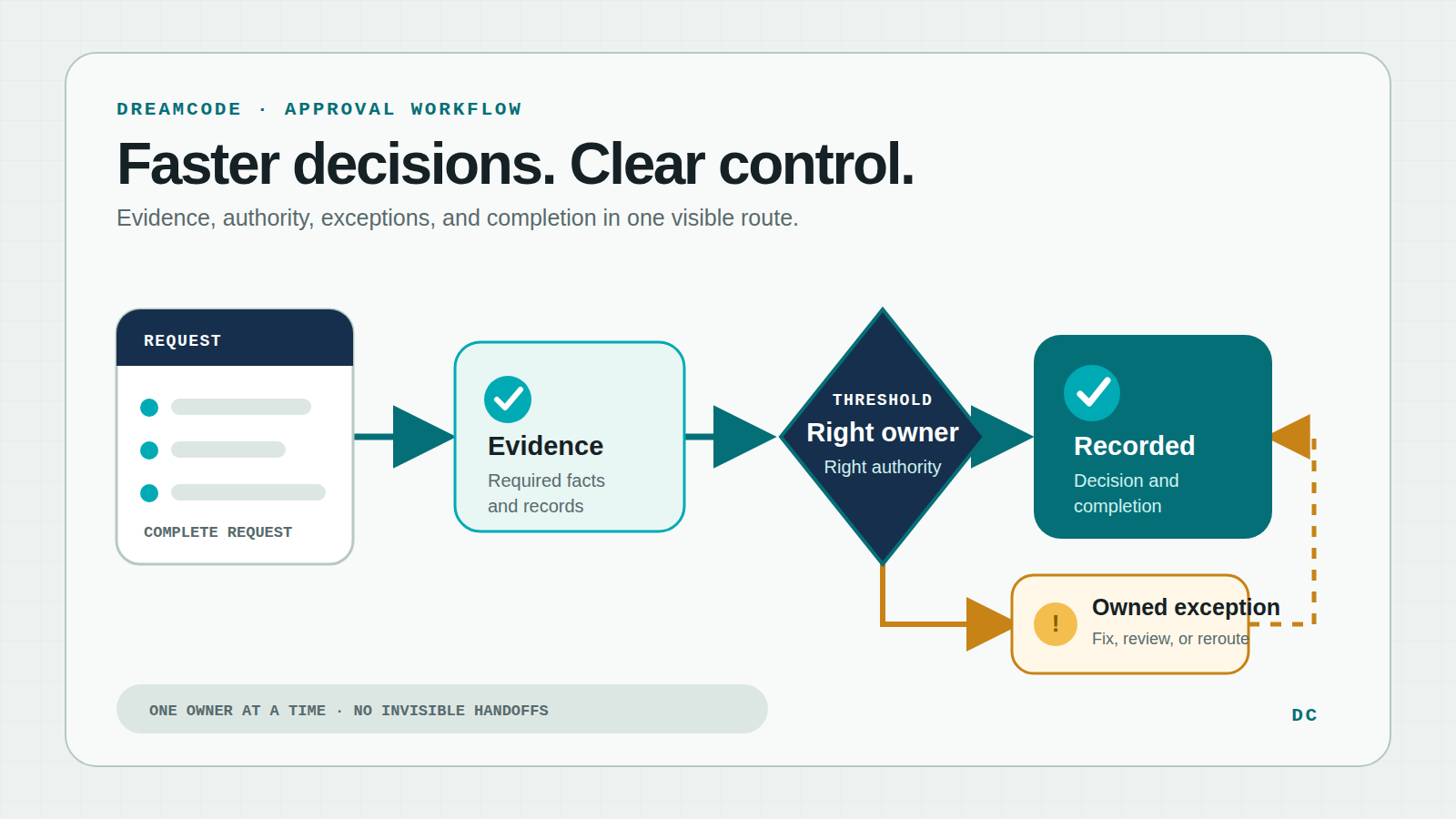
A practical approval route: complete request, right authority, recorded outcome and a visible route for unusual cases.
Why the owner becomes the bottleneck
Most owners do not decide to approve everything. It happens gradually.
A manager sends a purchase request without the quotation. A salesperson asks for a discount without saying how long the offer will last. A staff member applies for leave, but nobody has checked who will cover the shift. You ask a question, the answer arrives later in another chat, and the original request disappears under newer messages.
To prevent mistakes, staff learn to ask you about every case. You become the safest route, even when another manager already has enough knowledge and authority to decide. The business stays under control, but work slows whenever you are in a meeting, travelling or simply dealing with something more important.
The problem is therefore bigger than slow replies. The team lacks a shared rule for what can move without you.
Start with one type of approval
Do not try to repair purchases, claims, leave, discounts and hiring in one project. Pick the approval that causes the most repeated waiting.
Purchase requests are often a useful first choice because the cost of delay is visible and the owner can usually describe the rules. But another workflow may be more urgent in your business. Choose one where:
- requests happen often enough to learn from;
- staff repeatedly chase the same person;
- missing details cause back-and-forth questions; and
- there is a clear business outcome after approval.
Follow five or ten recent requests from the first ask to the final outcome. Note where the request waited, what information was missing and why it reached you. This is more useful than designing the new route from memory.
If the wider process is still unclear, use the earlier guide on when a person should remain involved in an automated workflow before deciding what the software should handle.
Decide what only you should approve
The fastest approval is not always the one with the fewest people. It is the one that reaches the right person with enough information to decide.
Write down the situations that genuinely need the owner. These may include a purchase above a chosen amount, spending outside an agreed budget, an unusually large customer discount, or leave that would leave an important role uncovered. Keep the list short and tied to real business risk.
Then give named managers authority over ordinary cases within clear limits. For example:
- A department manager may approve planned purchases below a set amount when the quotation and budget reference are attached.
- A supervisor may approve normal leave when entitlement and shift coverage are confirmed.
- A sales manager may approve discounts within an agreed range when the price, reason and expiry date are stated.
- Anything outside those limits comes to you with the exception explained.
These are examples, not recommended amounts or company policy. Your limits should reflect cash flow, margins, staffing, legal duties and the experience of the person receiving the authority.
Avoid adding a second or third approver simply so more people can see the request. People who need visibility can receive a report. An approval step should exist only when that person is making a distinct decision.
Make every request answer the approver’s questions
A fast route still fails when requests arrive half complete. The requester should provide the information an approver normally has to chase.
For a purchase, that may be the item or service, amount, supplier, business reason, required date, quotation and budget owner. For leave, it may be the dates, balance, reason category where appropriate, and coverage arrangement. For a discount, it may be the customer, normal price, proposed price, reason and offer expiry.
Do not turn this into a long form. Every required field should help someone apply a rule or make a decision. If nobody uses a field, remove it.
Give the approver a small set of useful responses:
- approve;
- reject with a reason;
- return for missing information; or
- send to the named person who handles unusual cases.
Official Microsoft guidance shows that approval tools can offer custom responses such as “Need more info” and continue differently according to the response. The useful lesson is not about one product. It is that “I cannot decide yet” needs a visible next step and an owner, not another loose message.
Keep WhatsApp as the alert, not the only record
WhatsApp may remain the quickest way to tell a manager that a request needs attention. The risk comes when the chat is also the only place where the request, documents and final decision exist.
A useful approval setup keeps one central request page or record. The approver can open it from the alert, see the latest information and respond there. Staff can then check whether the request is waiting, approved, rejected, returned or finished without asking you.
This matters when somebody is away or when a customer, supplier or employee later asks what happened. The business should be able to find the request, who decided, when they decided and what happened next.
It also reduces accidental exposure. A leave request may contain personal information; a discount may reveal pricing; a purchase may include bank or supplier documents. Put only the minimum useful detail in the notification, and control who can open the full record. Malaysia’s Personal Data Protection Department publishes the official text of the Personal Data Protection Act 2010 for businesses to check against their own obligations.
For your IT person
Give each request a unique reference and keep the request, attachments, decision, comments, timestamps and later changes together. Check permission on every screen and direct link, not only on the menu. A reminder must not create a duplicate approval. Record failed notifications or follow-on actions in a queue that an assigned person can see and retry safely. Support delegates with start and end dates, and remove their access automatically afterward. Keep a readable export for audit or dispute handling. Test normal cases, exact approval limits, missing information, changed amounts, absent approvers and failed follow-on actions before rollout.
Plan for absence and unusual cases
An approval route works on a normal day and then breaks when the usual manager is on leave. Decide the fallback before launch.
A delegate should have a defined period and the same or narrower authority. A request should never be approved by its own requester when separation matters. If a request changes materially after approval—for example, the amount or supplier changes—the rules should say whether it must be reviewed again.
Also separate approval from what happens afterward. Approving a purchase does not prove that an order was placed. Approving leave does not update the roster by itself. Approving a discount does not prove the correct quotation reached the customer.
Keep the request visible until the promised next action happens, or until a named person closes the problem. Otherwise you will replace “waiting for approval” with “approved but forgotten.”
Use reminders carefully
More reminders do not fix unclear ownership. They often create more noise.
Set an expected response time that matches the work. A routine leave request may be measured in working hours or days; an urgent customer discount may need a much shorter response. Then decide what happens when that time passes:
- remind the current approver once;
- mark the request as overdue where the team can see it; and
- send it to the documented delegate or escalation owner.
Never treat silence as approval for a sensitive decision. If urgent work sometimes needs a special route, define who may use it and what must be reviewed afterward.
Check whether the owner is actually leaving the routine path
For the first month, review a few simple measures each week:
- how long requests wait before a decision;
- how many come back because information is missing;
- how many become overdue;
- how many ordinary requests still reach the owner; and
- how many are approved but not carried out.
These numbers show different problems. A high return rate suggests the request is unclear. Many overdue items may mean the wrong approver or response time. If routine cases still reach you, the limits may be too narrow, managers may not understand their authority, or staff may not trust the new route.
Talk to the people using it as well. Ask requesters what they still send in chat, and ask approvers what they must look up elsewhere. Fix repeated friction before adding another department.
Choose software after the rules are clear
You may be able to configure an approval feature in software you already use. A ready-made workflow tool can suit common processes. Connecting existing systems may be better when the request starts in one place and the approved action belongs in another. Custom work is worth considering when your rules, permissions or follow-on work are too specific for a standard product.
Whichever route you choose, start with the same written decisions: who may approve what, which facts are required, what happens when a case falls outside the limit, and who owns the next action. Software can speed up a clear rule. It cannot decide an unclear one for you.
The practical result should be simple: managers can handle ordinary work within known limits, staff can see what is happening, and you receive the few decisions where an owner’s judgement is genuinely needed.
Next on the reader path: turn WhatsApp enquiries into a simple CRM workflow so follow-up stays owned after the first message.
Sources checked
- Microsoft Learn: Create approval flows with custom responses — official example of named approval responses and response-based routing.
- Personal Data Protection Department: Personal Data Protection Act 2010 (Act 709) — official Malaysian reference point for personal-data obligations.
- Dreamcode: When Should You Keep a Human in the Loop for AI Workflows? — the preceding reader-path article on deciding where human judgement belongs.
- Dreamcode: How to Scope the First Version of an AI or Automation Project — guidance on limiting the first release to one useful workflow.
- Dreamcode: How to Turn WhatsApp Enquiries Into a Simple CRM Workflow — the following reader-path article on keeping follow-up visible and owned.
Evidence checked on 12 October 2026. Product capabilities, URLs, internal policies and legal requirements can change; verify the current position before implementation.