On this page
- First diagnose why the team needs more capacity
- Decide at the task level, not the job-title level
- Tasks that are stronger automation candidates
- Tasks that are stronger hiring candidates
- Compare automation, hiring, and a hybrid
- Cost and ROI calculator
- Use a five-step decision framework
- 1. Define the outcome
- 2. Measure the current workload
- 3. Calculate the current cost of the workflow
- 4. Estimate the automation and hiring scenarios
- 5. Test the risk before committing
- Check the evidence behind the calculator
- A Malaysian operating example
- When should you automate first?
- When should you hire first?
- When is a hybrid better?
- Common decision mistakes
- Comparing software cost with salary alone
- Automating before the normal path is stable
- Ignoring exception volume
- Assuming every saved hour becomes cash
- Removing human accountability
- Frequently asked questions
- Is automation always cheaper than hiring?
- Should a small business automate before employing its first operations person?
- Can AI replace an administrative role?
- How should a business test the decision?
- Questions for the planning meeting
- Sources
When work piles up, a business may assume it must either automate the job or hire another person. Most roles contain a mix of tasks, so that choice is too broad.
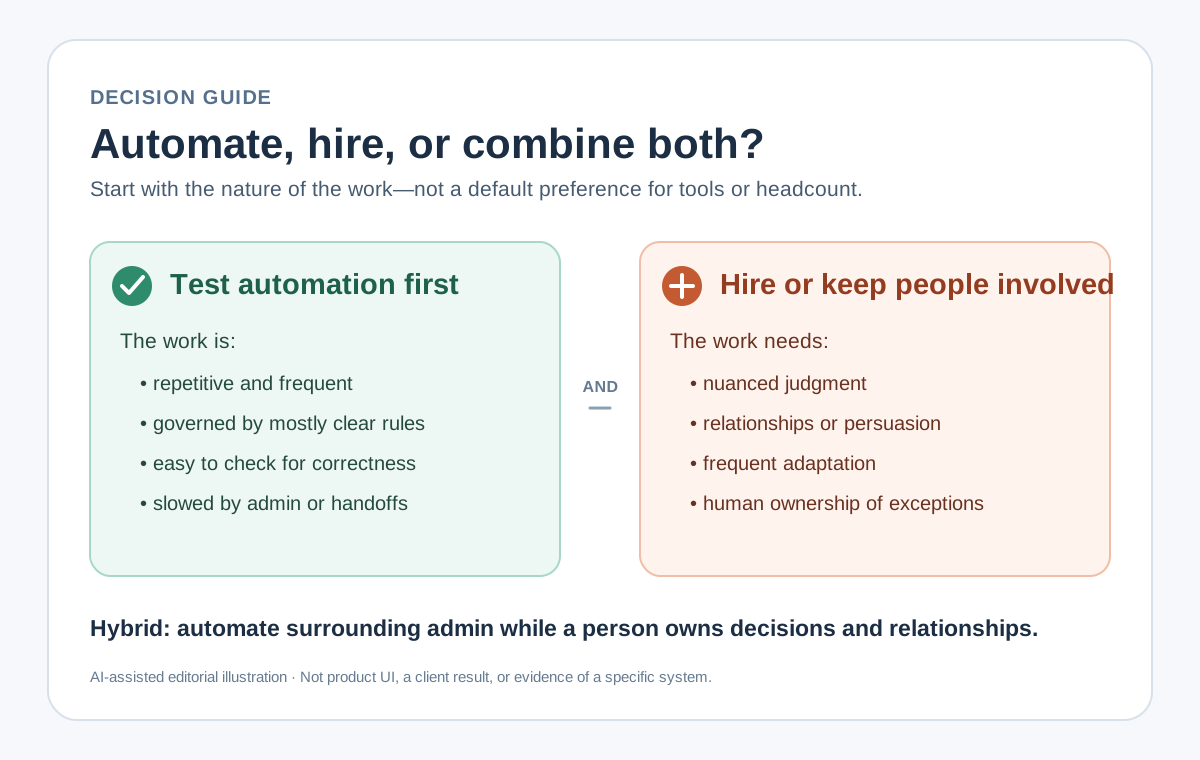
Quick answer: automate stable, repetitive steps; hire for judgment, relationships, and ownership; use a hybrid when a person should own the outcome but software can remove the surrounding administration.
The decision should be based on workload, cost, risk, and the nature of the work—not on a belief that software is always cheaper or people are always more flexible.
First diagnose why the team needs more capacity
A growing queue does not automatically mean the business needs another employee or a new automation. Capacity pressure usually comes from one of four causes:
- Demand increased. The existing process works, but there is more of it.
- The process is inefficient. Staff spend time copying data, chasing approvals, or correcting avoidable errors.
- A capability is missing. The business needs judgment, sales ability, technical knowledge, or relationship ownership that nobody currently provides.
- Priorities are unclear. Work accumulates because everything enters the same queue without triage.
Automation can help with the second and fourth causes. Hiring can help with the first and third. If the underlying problem is unclear, either investment can add cost without removing the bottleneck.
Decide at the task level, not the job-title level
An operations coordinator might receive enquiries, enter customer details, check documents, answer questions, negotiate exceptions, coordinate colleagues, and maintain a client relationship.
Some of those tasks are good automation candidates. Others need a person.
The International Labour Organization’s 2025 analysis of generative AI exposure reached a similar task-level conclusion: most occupations contain work that still requires human input, so job transformation is more likely than complete replacement. Break down the work before deciding whether to remove or add an entire role.
Tasks that are stronger automation candidates
- repeated frequently
- follow a reasonably stable normal path
- use structured or consistently interpretable inputs
- produce an output that can be checked
- create delays mainly through copying, routing, reminders, or handoffs
- have exceptions that can be identified and assigned to a person
Tasks that are stronger hiring candidates
- require negotiation, empathy, persuasion, or trust
- involve ambiguous trade-offs with real consequences
- change faster than a system can be maintained
- depend on tacit knowledge or physical context
- need a clearly accountable human owner
- create value through relationships rather than transaction speed
The middle ground is common: automate intake, data movement, reminders, and first drafts while keeping a person responsible for decisions and customer commitments.
Compare automation, hiring, and a hybrid
| Option | Best fit | Main cost shape | Main risk |
|---|---|---|---|
| Automate | Stable, frequent, checkable workflow steps | Discovery, configuration or build, integration, maintenance, review | Automating the wrong process or underestimating exceptions |
| Hire | Judgment-heavy, relationship-led, changing work | Recruitment, onboarding, salary, statutory contributions, tools, management | Adding capacity without fixing avoidable operational friction |
| Hybrid | A human should own the outcome but routine steps consume time | Smaller automation plus retained or new human ownership | Unclear handoffs between the system and the person |
This comparison is not a promise that automation will cost less. A low-volume or unstable workflow may be cheaper to handle manually. A high-volume stable workflow may justify a system. The hybrid option often becomes strongest when risk and customer experience matter.
Cost and ROI calculator
Compare each scenario over the same period. Include the full cost, the capacity it creates, and any benefit the business can actually measure.
Planning estimator
Automation cost and ROI
Use your own payroll, workload, implementation, and hiring figures. Blank fields count as zero.
Enter your figures, then select Calculate.
This estimator is for planning, not a quotation or financial forecast. Cost does not settle work that depends on judgment, relationships, accountability, or frequent exceptions.
The calculator discounts saved time using a value-capture percentage. Count only the share you expect to turn into a measurable benefit, such as avoiding overtime, delaying a hire, increasing useful capacity, or reducing an existing cost. Use a low percentage when the team has no clear plan for the released time.
ROI is calculated as:
(realised benefit over the period − automation cost over the period) ÷ automation cost over the period
A positive result may justify a pilot. You still need to assess judgment, exceptions, and accountability before making the investment.
Use a five-step decision framework
1. Define the outcome
Write one sentence describing what must improve.
Weak: “We need AI.”
Better: “Every complete sales enquiry should reach the correct owner with the customer details, requested service, and next action recorded.”
The better statement can be measured and does not prejudge the solution.
2. Measure the current workload
Use actual operating data for a representative period:
- cases per week
- minutes per case
- waiting time between steps
- percentage of cases requiring an exception
- rework or correction frequency
- people involved in each handoff
Do not use the employee’s full working week if only part of the role is affected. Measure the specific task bundle being considered.
3. Calculate the current cost of the workflow
Start with:
Monthly handling cost = monthly task hours × loaded hourly employment cost
Then add costs the business can defend: rework, delayed billing or follow-up, temporary labour, overtime, and software licences already used for the workaround.
Use the business’s actual payroll and statutory-cost information. Do not rely on a generic online salary or contribution estimate for an investment decision.
4. Estimate the automation and hiring scenarios
For automation, include discovery and workflow mapping, configuration or development, integrations, testing, rollout, ongoing usage, maintenance, and human review.
For hiring, include recruitment, onboarding, salary and statutory employer costs, equipment, software, management time, and the administrative work that remains.
Compare both across the same evaluation period. A twelve-month view can be useful, but the period should match the investment and business cycle.
5. Test the risk before committing
Ask:
- What happens when the system is wrong?
- Can a person detect and correct the error?
- Who owns an exception?
- Can the workflow continue if the system is unavailable?
- Is customer or employee data involved?
- Can the business change the process later?
For AI-assisted steps, risk management must be part of the design. NIST’s AI Risk Management Framework treats trustworthiness as something to incorporate throughout design, use, and evaluation—not as a final compliance checkbox.
Check the evidence behind the calculator
Complete this before relying on the result or approving a new role:
| Question | Your evidence |
|---|---|
| What outcome must improve? | |
| Which exact tasks create the pressure? | |
| Cases and task hours per month? | |
| How stable is the normal process? | |
| What percentage needs human judgment? | |
| What is the current monthly handling cost? | |
| What would automation cover—and not cover? | |
| What percentage of saved time would create measurable value? | |
| What would the new hire own beyond routine handling? | |
| Who owns exceptions and customer commitments? | |
| What result would justify continuing after a pilot? |
If these questions cannot be answered, the next step is workflow discovery rather than procurement or recruitment.
A Malaysian operating example
Consider enquiries arriving through WhatsApp in English, Bahasa Malaysia, Mandarin, or a mix of languages.
Framing the choice as “replace the service role with AI” versus “hire another service employee” hides the different kinds of work involved. Break the workflow into tasks:
- capture the customer’s details
- identify the request
- retrieve relevant product or inventory information
- prepare a response or invoice
- negotiate unusual requirements
- approve a commitment
- maintain the customer relationship
Dreamcode’s public portfolio describes a tyre-workshop workflow that interprets multilingual chat requests, checks inventory, prepares invoices, and routes exceptions for review. This is a hybrid pattern: the system assists with repeatable information work, while a person remains responsible for exceptions and consequential decisions.
The same logic applies to bookings, quotations, document intake, order routing, and internal approvals. Automate the stable steps; keep accountability visible.
When should you automate first?
Test automation first when:
- the process is already understood
- volume is high enough to matter
- staff repeat the same administrative steps
- correctness can be checked
- exception ownership is clear
- a limited pilot can prove or disprove the case
Testing the workflow first can prevent a new employee from spending most of the role carrying avoidable administrative work.
When should you hire first?
Hire first when:
- the missing capacity is mainly judgment, expertise, leadership, sales, or relationships
- the process changes frequently
- demand is urgent and system implementation would arrive too late
- exceptions are the normal work rather than a small minority
- the role creates new value rather than only processing existing work
Automation may still support that employee, but it should not be used to disguise a capability gap.
When is a hybrid better?
Choose a hybrid when a person should own the outcome but repeatable administration consumes their time.
Examples include:
- software captures and classifies an enquiry; a salesperson decides how to respond
- a system prepares invoice data; finance approves exceptions
- reminders and document checks are automated; an operations manager owns delivery
- an AI assistant drafts a reply; a service employee reviews the commitment
A hybrid design needs explicit handoffs. The system should show when it acted, what information it used, and when a person must take over.
Common decision mistakes
Comparing software cost with salary alone
Both options have broader costs. Compare the complete workflow scenarios over the same period.
Automating before the normal path is stable
If the team cannot agree what should happen, software will encode disagreement rather than solve it.
Ignoring exception volume
A workflow that sends most cases back to staff may move work around instead of removing it.
Assuming every saved hour becomes cash
Time saved only creates value when the business can redeploy it toward useful work, avoid a real future cost, improve service, or increase capacity.
Removing human accountability
Customers and employees still need to know who owns an outcome when the system fails or reaches its limits.
Frequently asked questions
Is automation always cheaper than hiring?
No. Automation carries discovery, implementation, integration, maintenance, and review costs. It is easier to justify when the workflow is frequent, stable, and measurable.
Should a small business automate before employing its first operations person?
Not automatically. If the work needs ownership, judgment, and process design, an experienced person may be necessary before useful automation can be designed.
Can AI replace an administrative role?
It is safer to assess tasks rather than whole roles. AI may assist with reading, classification, drafting, and routing, while people retain exceptions, relationships, and accountability.
How should a business test the decision?
Measure one workflow, define success and failure criteria, and test the smallest useful change. Compare the observed result with the hiring scenario before scaling.
Questions for the planning meeting
Identify which tasks should disappear, which decisions need a person, what capacity the business actually needs, and who will own the outcome.
If you need help mapping that workflow, Dreamcode’s enterprise automation service is the appropriate starting point. You can also read What Should You Automate First? and What Does a Good Workflow Handoff Look Like?.
Sources
- International Labour Organization: Generative AI and Jobs — A Refined Global Index of Occupational Exposure — supports the task-level framing and finding that job transformation is more likely than complete replacement for most occupations.
- NIST: AI Risk Management Framework — supports incorporating trustworthiness and risk management throughout AI design, use, and evaluation.
- Dreamcode: Selected work — supports the public tyre-workshop workflow description.
- Dreamcode: What Should You Automate First? — related workflow-selection guide.