On this page
- Excel may still be enough
- The clearest signs that the spreadsheet is no longer enough
- People keep creating side versions
- Staff check the shelf before promising a sale
- “In stock” means different things to different people
- Buying decisions use old numbers
- Corrections cannot be explained later
- Online and outlet sales compete for the same item
- What a good inventory management system should help you answer
- What to ask before you buy
- Can it handle the awkward cases we already have?
- What number will sales see?
- How will stock move between locations?
- How will we count and correct stock?
- Does it fit the systems we are keeping?
- Can we leave with our data?
- Buy a product, connect what you have, or build a missing piece?
- Test one ordinary item and one difficult item
- Sources
Your spreadsheet says an item is in stock, but staff cannot find it. Another item gets ordered twice, while a customer buys something that was already sold at another outlet. If you own a Malaysian business with 10–100 staff, this guide will help you decide whether Excel is still enough—and what to ask before you buy an inventory management system.
The aim is not to remove spreadsheets because they look old. It is to stop stock mistakes that are now costing time, sales or trust.
Excel may still be enough
A spreadsheet can work well when one person controls a small range of items in one location, updates happen at clear times, and the physical count is easy to check. It is familiar, flexible and inexpensive. Replacing it too early can give your team a larger tool without solving a real problem.
The question is whether the spreadsheet still matches how your business now operates.
Growth usually adds more people, outlets, sales channels, product variants, returns and urgent changes. A sheet that was accurate when one person updated it once a day can become unreliable when a shop, warehouse and online team all need the same number now.
Before you shop for software, be sure stock is the workflow worth fixing. What Should You Automate First? explains the reader-path step before this one: choosing the repeated handoff that causes the most avoidable work.
The clearest signs that the spreadsheet is no longer enough
One stock mistake does not prove you need new software. A pattern does.
People keep creating side versions
The main file is no longer the full story. Staff keep copies on their laptops, send updates in WhatsApp, add notes beside printed counts or maintain a second sheet “just for online orders”. By the time someone combines everything, nobody is certain which number is current.
Staff check the shelf before promising a sale
Physical checks are sensible during a count. They are a warning sign when every customer promise requires someone to walk to the storeroom because the recorded number cannot be trusted.
“In stock” means different things to different people
The warehouse sees ten units on a shelf. Sales sees ten available. But three may already be promised to customers, two may be damaged and one may be waiting for inspection. A single total cannot explain what the business may actually sell.
Buying decisions use old numbers
Your purchaser orders extra because recent sales or transfers are missing, then discovers more stock at another branch. Or the sheet looks healthy because incoming stock was counted before it arrived. Over-ordering and stockouts can come from the same problem: the timing and meaning of the number are unclear.
Corrections cannot be explained later
Someone changes 42 to 37, but the reason lives in a chat message or memory. Was it a sale, damage, a transfer, a return or a counting mistake? If you cannot explain changes, the team cannot learn which part of the process keeps failing.
Online and outlet sales compete for the same item
An item sells online while outlet staff are taking payment for the last unit. The sale itself is not the only problem. The business has no agreed point at which stock becomes reserved, released or available again after a cancellation.
When several of these signs appear every week, the cost is no longer just spreadsheet maintenance. It is time spent checking, apologising, cancelling, expediting and buying with poor information.
What a good inventory management system should help you answer
Do not begin with barcode scanners, dashboards or a long feature list. Start with the questions your team struggles to answer today.
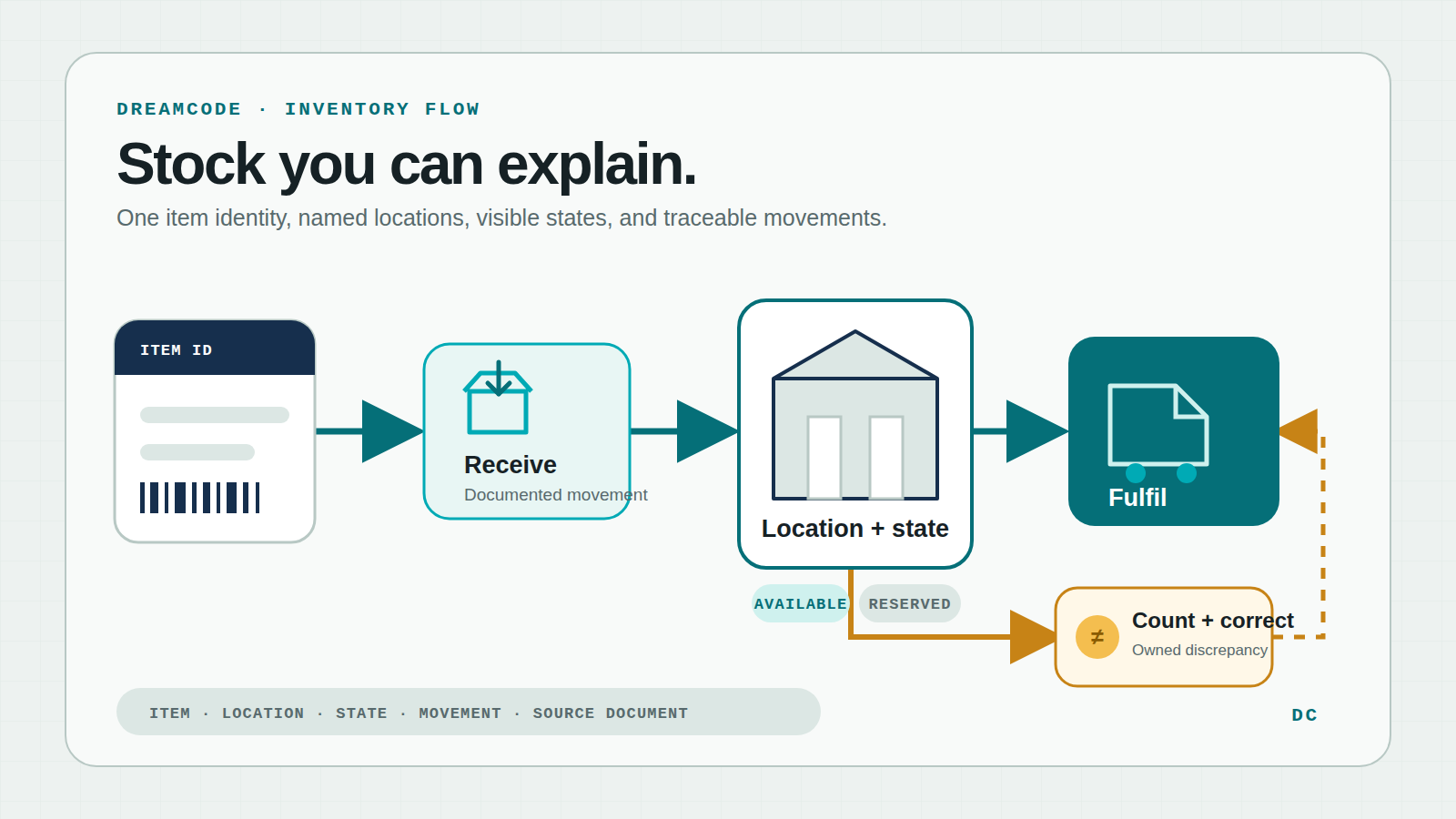
For any important item, the software should help staff see:
- which exact item or variant it is
- how many units are at each outlet, warehouse or other location
- how many are physically present, available to sell, reserved or unavailable
- what is expected to arrive and what is moving between locations
- which sale, receipt, return, transfer, count or correction changed the number
- who needs to act when the record and physical count disagree
Not every business needs batch tracking, serial numbers, expiry dates or bin locations. A spare-parts dealer, food producer, fashion retailer and workshop will need different detail. Ask what decisions each field helps someone make. If nobody will capture or use the information, adding it can make the new system harder to keep accurate.
The same applies to barcodes. Scanning can reduce typing, but it cannot fix two products sharing the same code or staff using different names for the same item. Clean item names, variants, units and locations come first.
What to ask before you buy
Can it handle the awkward cases we already have?
Bring recent examples to every demonstration: a partial delivery, damaged stock, a transfer between branches, a cancelled order, a return and a count that did not match. Ask the vendor to show what staff would see and do in each case.
A polished demonstration of one clean sale tells you little about the work that causes your team trouble.
What number will sales see?
Ask how the product calculates the quantity shown to outlet staff and online customers. Does it subtract confirmed orders? When does a cancelled order release its units? Is incoming stock shown separately from stock ready to sell? Can one channel keep a small buffer?
The names used by different products may vary. What matters is that your team agrees on the meaning and the software can support it.
How will stock move between locations?
A transfer should not simply disappear from one branch and appear at another. Ask whether staff can record dispatch, transit, receipt, a partial receipt and a difference. Decide who owns the stock while it is moving and who resolves a missing carton.
How will we count and correct stock?
Physical counts will still be necessary. The software should let staff count selected items or locations, compare the result, record a reason and control who may approve an adjustment. Microsoft’s current inventory guidance, for example, treats counting, adjustment and reclassification as defined activities rather than casual edits.
Does it fit the systems we are keeping?
List the tools that already matter: POS, online shop, marketplaces, accounting, purchasing or delivery. Ask which connections are included in the quoted edition, which rely on another provider and what happens when a transfer fails. A logo on a sales page is not proof that refunds, partial orders, variants and branch rules work the way you need.
Can we leave with our data?
Ask what you can export: items, balances, movements, orders, suppliers, counts and change history. Find out which format is provided and whether help is needed. A system can be useful now and still become a poor choice if leaving later means rebuilding your stock history by hand.
For your IT person
Test the exact product edition and accounts the business will use. Confirm stable item and location IDs, units, sales channels, stock categories and the event that changes each quantity. Check how POS, online orders and accounting exchange updates; how repeated or delayed updates avoid duplicate changes; and where failed transfers appear. Restrict who can edit items or adjust stock. Export sample items, balances and movement history. Test partial receipts, cancellations, returns, transfers, downtime and recovery with real examples before approving the setup.
Buy a product, connect what you have, or build a missing piece?
A ready-made inventory product usually fits when your receiving, selling, transfers, returns and counts follow common patterns. This kind of inventory software may require your team to change some habits, but that can be cheaper and safer than custom work.
Connecting existing tools may fit when your POS, online shop or accounting software already does its main job well and the biggest problem is repeated entry between them. One tool still needs to be responsible for the stock number staff rely on.
A custom piece may be justified when your stock workflow is central to how the business operates and ready-made products keep forcing harmful workarounds. It might be a small screen for branch transfers, a review queue for differences or a connection between systems—not a complete replacement for everything.
Do not choose custom work just because the current spreadsheet is messy. First agree on item names, locations, responsibilities and the meaning of “available”. Otherwise the new system will inherit the same disagreement in a more expensive form.
Test one ordinary item and one difficult item
Before signing, choose an ordinary fast-moving item and one item that regularly causes trouble. Follow both from receipt to storage, sale, return or correction.
Let the staff who do the work use the proposed setup. Watch whether they can find the item, record a movement, see what is available and understand a mismatch without asking the vendor to translate every screen.
Then compare the result with your current pain. Will staff stop maintaining side sheets? Can sales make a promise without calling the warehouse? Can purchasing see what is arriving? Can a manager explain why the quantity changed?
If the answer is yes for real cases, the software may be worth the disruption of changing. If the demonstration only works after your awkward cases are removed, keep looking or narrow the first project.
If ready-made products cannot fit the way your team handles stock, the Dreamcode custom solutions page explains when software built around the business may make sense.
Once you know the direction, the next reader-path step is turning it into a small, priceable job. How to Scope the First Version of an AI or Automation Project shows how to define one useful stock workflow, the cases it must handle and what can wait.
Sources
- Microsoft Learn: Count, adjust, and reclassify inventory — one current product example of formal counting, adjustment and location changes.
- GS1: Global Trade Item Number — standards context for uniquely identifying trade items; included as a source rather than a requirement for every business.
- Dreamcode: What Should You Automate First? — the preceding reader-path step for choosing the workflow to fix.
- Dreamcode: How to Scope the First Version — the following reader-path step for defining a practical first implementation.
If stock mistakes are becoming a weekly problem and you are unsure whether to buy, connect or build, book a free consultation with Dreamcode.