On this page
- Why the cheapest-looking option can become expensive
- Head-to-head comparison
- 1. Speed to launch
- 2. Fit with your workflow
- 3. Upfront cost
- 4. Integration and data flow
- 5. Control and ownership
- 6. Maintenance burden
- Choose off-the-shelf when
- Choose custom software when
- Consider the middle options first
- Configure
- Integrate
- Add a small internal tool
- Prototype
- A practical decision scorecard
- Questions to ask any vendor or development partner
- Common decision mistakes
- Building because the team dislikes change
- Buying based on a polished demo
- Ignoring exit costs
- Funding launch but not ownership
- FAQ
- Is custom software always more expensive?
- How much of our needs should an existing tool cover?
- Can we start off-the-shelf and build later?
- What is a good first custom release?
- Who should own a custom system internally?
- Need help choosing?
Choose an off-the-shelf tool when your workflow is common, the product covers most requirements, and adapting your process is acceptable. Choose custom software when the workflow is strategically important, materially different, and existing tools create persistent workarounds or constraints.
The real decision is not “build or buy?” It is which option creates the lowest total operating burden while protecting what makes the business valuable.
Quick answer: buy for standard capabilities; build for differentiated workflows. Before building, prove that configuration, integration, or a smaller internal tool cannot solve the problem.

Why the cheapest-looking option can become expensive
Off-the-shelf software has a visible subscription price. Custom software has a visible project price. Neither number tells the full story.
The total cost includes:
- Implementation and migration
- Configuration and integration
- Staff training
- Manual workarounds
- Data cleanup and exports
- Support and maintenance
- Change management
- The cost of being unable to change the workflow
A low subscription can be expensive if ten people compensate for the product every day. A custom build can be expensive if it recreates a standard feature that a mature product already handles well.
Head-to-head comparison
1. Speed to launch
Off-the-shelf: usually faster when the workflow matches the product. The team configures accounts, fields, permissions, and integrations instead of building core features.
Custom: takes longer because discovery, design, development, testing, deployment, and handover are part of the work.
Winner: off-the-shelf for immediate standard needs.
2. Fit with your workflow
Off-the-shelf: offers a workflow designed for a broad market. Good products include flexibility, but that flexibility still has boundaries.
Custom: can match specialised approvals, calculations, roles, data structures, and customer experiences.
Winner: custom when the workflow itself is a source of advantage or when workarounds are costly.
3. Upfront cost
Off-the-shelf: lower initial commitment in most cases. Costs may rise with users, usage, modules, or implementation partners.
Custom: higher initial investment because the organisation funds the product design and build.
Winner: off-the-shelf when cash, time, or certainty is limited.
4. Integration and data flow
Off-the-shelf: may provide standard APIs and connectors, but the available data model and automation limits are set by the vendor.
Custom: can be designed around existing systems and ownership rules, although every integration still needs maintenance.
Winner: depends on the ecosystem. Check the actual API and export capability before deciding.
5. Control and ownership
Off-the-shelf: the vendor controls the roadmap, pricing, availability, and feature retirement. You operate within the product’s terms.
Custom: provides more control over workflow, user experience, data handling, and priorities. It also makes you responsible for security, reliability, and evolution.
Winner: custom for control; off-the-shelf for delegated product responsibility.
6. Maintenance burden
Off-the-shelf: updates and infrastructure are usually handled by the vendor, while your team maintains configuration, integrations, training, and governance.
Custom: your organisation or delivery partner must plan updates, monitoring, backups, security work, and support.
Winner: off-the-shelf for standard capability with acceptable vendor dependence.
Choose off-the-shelf when
- The requirement is common across many companies
- A mature product covers the critical 80–90% of the workflow
- The team can adapt its process without losing an advantage
- You need value quickly
- The vendor provides suitable security, support, APIs, and exports
- The cost remains reasonable as users and usage grow
Common examples include accounting, payroll, commodity CRM, email marketing, file storage, and standard project management.
Choose custom software when
- The workflow is central to how the company competes
- Existing tools force repeated manual work or duplicate records
- Several systems need a shared operating layer
- Roles, approvals, calculations, or customer journeys are genuinely specific
- You need control over the product roadmap or deployment
- The expected value can justify ongoing ownership
Custom software is strongest when it encodes a valuable way of working—not when it merely copies familiar software with fewer features.
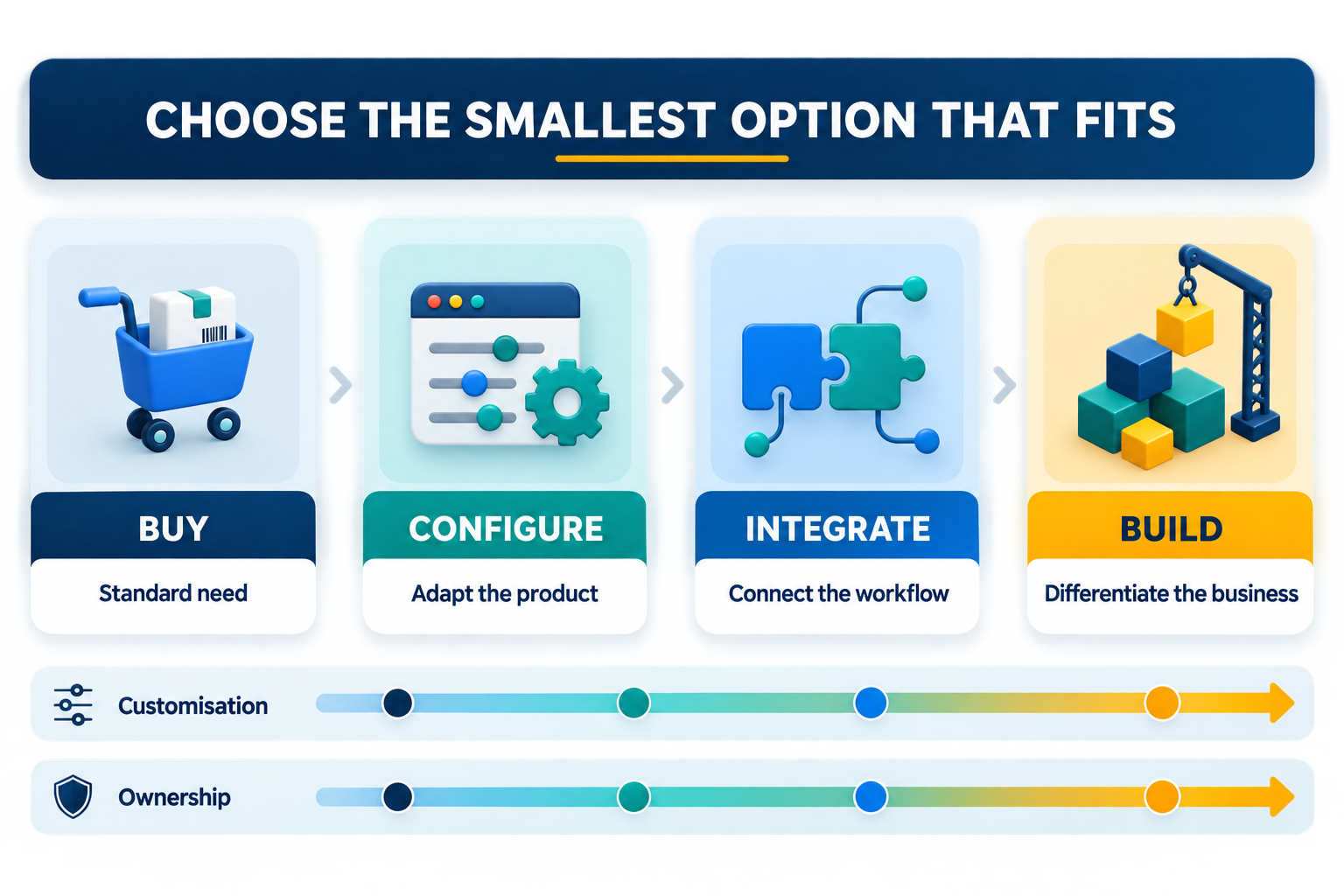
Consider the middle options first
Build-versus-buy is not binary. Before commissioning a full system, consider:
Configure
Use an existing platform with custom fields, views, permissions, and workflows.
Integrate
Connect the products you already use so information moves without repeated entry.
Add a small internal tool
Build only the missing control panel, workflow layer, or specialist interface while mature products continue handling standard functions.
Prototype
Test the riskiest assumption with a thin version before funding the full build.
The best answer is often a hybrid: buy the commodity layer and build the differentiating layer.
For a structured assessment of a specialised build, see Dreamcode’s custom solutions. If the immediate bottleneck is repeated handoffs rather than a whole new system, enterprise automation may be the better first move; start by identifying what to automate first.
A practical decision scorecard
Rate each statement from 1 to 5:
- This workflow differentiates our business.
- Existing products create costly workarounds.
- We can define the workflow and its exceptions.
- The benefit can be measured.
- We can fund ongoing ownership, not just launch.
- Integration and data control are important.
- The requirement will remain relevant for several years.
A high score does not automatically justify custom software, but it supports deeper discovery. A low score usually points toward buying, configuring, or simplifying.
Questions to ask any vendor or development partner
- Can we export all important data in a usable format?
- Which integrations exist, and what are their limits?
- How does pricing change with scale?
- Who owns security updates and incident response?
- What happens if we stop using the product or partner?
- Which requirement is most expensive and why?
- What is the smallest release that proves value?
Common decision mistakes
Building because the team dislikes change
Custom software should not preserve an inefficient process simply because it is familiar.
Buying based on a polished demo
Test the product with real data, real users, and the awkward exceptions—not only the happy path.
Ignoring exit costs
Evaluate data portability, vendor lock-in, replacement effort, and documentation before committing.
Funding launch but not ownership
Software needs monitoring, support, security work, and changes. Include those costs in the decision.
FAQ
Is custom software always more expensive?
It usually costs more upfront. It may create lower total operating cost when standard tools require extensive workarounds, but that case should be demonstrated with numbers.
How much of our needs should an existing tool cover?
There is no universal percentage. Focus on whether it covers the critical workflows and whether the missing parts create meaningful cost, risk, or lost opportunity.
Can we start off-the-shelf and build later?
Yes. Choose products with good exports and APIs so the first decision does not trap your data or workflow.
What is a good first custom release?
The smallest version that solves one valuable workflow end to end, includes exception handling, and can be measured.
Who should own a custom system internally?
A business owner should own outcomes and priorities, while technical ownership covers reliability, security, and delivery.
Need help choosing?
If your team is choosing between another subscription and a custom build, Dreamcode can map the workflow, workarounds, and total operating cost before recommending a direction.